



Contents: Checking the generator 🠛 Rotor replacement 🠛 Replacing the voltage regulator 🠛 Replacing brushes 🠛 Replacing the stator 🠛 Replacing the bridge rectifier 🠛
Checking the generator
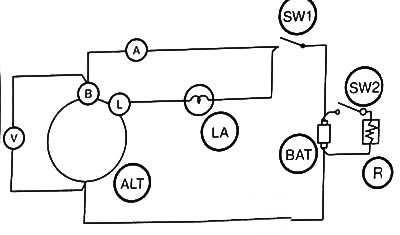
Perform a generator test on the bench according to the diagram given above, using:
- ammeter with scale 0-150 A (for 110A generator) or ammeter with scale 0 - 100 A (for 70 A generator),
- voltmeter with scale 0-30 V,
- variable resistor, over 150 A (for 110A generator) or a variable resistor, more than 100 A (for 70 A generator).
1. Checking the regulated voltage
1. Close the contact (SW1), while the contact (SW2) must be open.
In this case, the control lamp (LA) should light: if it does not light, measure the voltage at terminal L.
2. Check if the generator voltage value is close (ALT) (terminal L, contact 1) to the battery voltage value.
Low voltage indicates that the test lamp or its wiring is faulty.
3. Gradually increase the generator speed, observing how the control lamp lights up at a speed of 2000 rpm.
Voltage above 15V indicates a faulty regulator. If the supplied voltage does not exceed the battery voltage, the generator does not produce current.
In this case, the generator should be removed to identify the faulty component.
4. Gradually increase the generator speed to 5000 rpm.
If the ammeter reading does not exceed 5 A, measure the voltage: this is the regulated voltage.
Since the regulator is a temperature compensation element, the regulated voltage changes depending on the regulator temperature. If the temperature exceeds 10°C, the regulated voltage decreases by approximately 0-0.12V.
5. If the generator current value exceeds 5 A, continue charging until it drops below 5 A or replace the battery (BAT) with a charged one.
Replace the voltage regulator if the regulated voltage is not 14.4±0.3V (at 20°C).
2. Checking the current
1. Close the contact (SW1): the control lamp should light.
2. Increase the load resistance (R) to the maximum value (reduce the current value).
3. Close the contact (SW2). Set the generator speed to 3000 rpm.
4. Adjust the load resistance so that the voltage at terminal B is 13.5 V.
5. After 30 minutes, adjust the load resistance to ensure a voltage of 13.5 V at terminal B.
6. Increase the rotation speed to 6000 rpm.
7. Check the ammeter readings:
- the value must be at least 72.5 A for a 70 A generator and at least 108 A for a 110 A generator (measurements should be taken in a heated state). If the specified values are not within the norm, remove the generator to identify the faulty component.
Rotor replacement
1. Mark the installation position of the front and rear bearings.
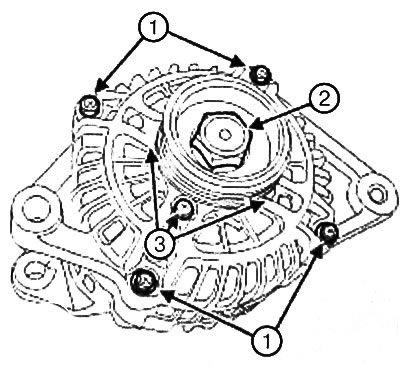
2. Loosen the bolts (1) of the front bearing.
Note: To avoid damaging the stator winding, do not insert the screwdriver further than 2 mm.
3. Disconnect the front bearing pulley and rotor assembly from the stator and rear bearing assembly using a flat-head screwdriver.
Note: Be careful not to damage the rotor poles when removing the pulley nut.
4. Place the pulley in a vice, placing the old belt between the jaws to avoid damaging the pulley.
5. Remove:
- pulley nut (2),
- idler pulley,
- front bearing.
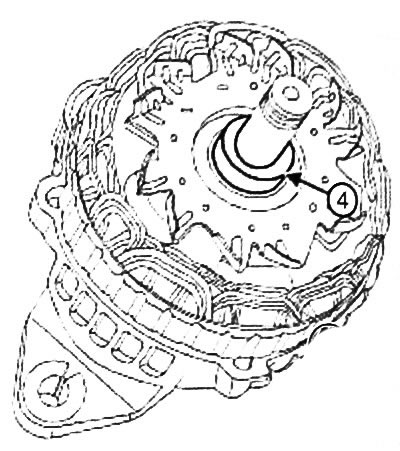
6. Remove the spacer (4).
Note: If the front bearing is noisy or rotates erratically, it is recommended to check the condition of the bearing while it is installed in the housing.
7. Check the condition of the front bearing for:
- extraneous noises,
- lubricant leaks (if the leak is small, wipe and remove traces of grease),
- uneven rotation.
8. Remove:
- four bearing stop bolts (3),
- bearing limiter.
9. Remove the bearing from the front bearing housing.
Note:
- If noise is heard when the rear bearing is running or the bearing rotates jerkily, it is recommended to check the condition of the bearing when the front bearing is installed on the shaft.
- The rear bearing is not a separate part and is not supplied separately. If the bearing is faulty, replace the rotor.
10. Check the bearing for:
- extraneous noises,
- lubricant leaks (if the leak is small, wipe and remove traces of grease),
- uneven rotation.
Note: The collector is not supplied separately, the collector is supplied mounted on the rotor.
11. Measure the collector diameter: the minimum permissible value of the collector diameter when worn is 22 mm.
12. Check components that may have excessive wear: brushes, rotor winding resistance, bearings for leaks, traces of oil, etc.
13. Check for a connection between the winding and the ground by measuring the resistance between the collector rings and the shaft or rotor poles: the resistance should be infinite.
14. Measure the winding resistance by measuring the resistance between the collector rings. The resulting resistance value should be:
- 2,3 - 2,8
 at 20°C for a 70 A generator,
 - 1,8 - 2,2
 at 20°C for a 110 A generator.
Attention: The removed front bearing must be replaced.
Note: Bearings with polymer protection do not require lubrication
15. Remove grease to prevent the bearing outer ring from sticking to the bearing housing.
16. Install:
- front bearing,
- front bearing limiter,
- four bolts securing the front bearing stop.
17. Tighten the front bearing stop bolts to a torque of (3 Nm).
18. Install:
- spacer,
- front bearing,
- idler pulley,
- pulley nut.
Note: Be careful not to damage the rotor poles when tightening the pulley nut.
19. Install the pulley in a vice, placing the old belt between the jaws to avoid damaging the pulley.
20.3 Tighten the pulley nut to a torque of (117 Nm).
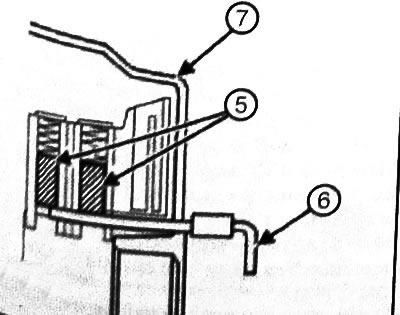
21. Compress the brushes (5) and hold them in this position using a rod (6) or wire inserted into the hole in the rear of the rear bearing (7).
22. Heat the area around the rear bearing housing to 50-60°C to make it easier to install the rear bearing into the housing.
23. Install:
- front bearing, pulley and rotor assembly to stator and rear bearing assembly,
- front bearing bolts.
24. Remove the rod or wire that secures the brushes.
25. Tighten the front bearing bolts to a torque of (4 Nm).
26. Turn the pulley by hand to check the ease of rotation of the rotor.
27. Check the correct operation of the generator (see "Checking the generator").
Replacing the voltage regulator
1. Disconnect the front bearing, pulley and rotor assembly from the stator and rear bearing assembly using a flat-head screwdriver (see "Replacing the Rotor").
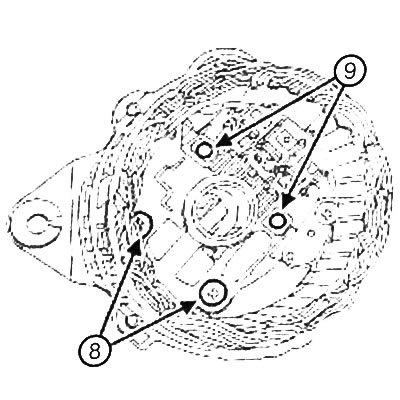
2. Unscrew the bolts (8) of the voltage regulator.
3. Disconnect the soldered connections (9) of the voltage regulator and disconnect the brushes and voltage regulator from the bridge rectifier.
Note: After completing the generator installation, check the voltage regulator by measuring the supplied voltage.
4. Remove the voltage regulator.
5. Install the voltage regulator.
6. Solder the connections of the voltage regulator to the bridge rectifier.
7. Install the voltage regulator bolts.
8. Tighten the voltage regulator bolts to a torque of (4 Nm).
9. Install the front bearing, pulley and rotor assembly onto the stator - rear bearing assembly (see "Replacing the rotor").
10. Check the correct operation of the generator (see "Checking the generator").
Replacing brushes
1. Disconnect the front bearing, pulley and rotor assembly from the stator and rear bearing assembly using a flat-head screwdriver (see "Replacing the Rotor").
2. Remove the voltage regulator (see "Replacing the voltage regulator").
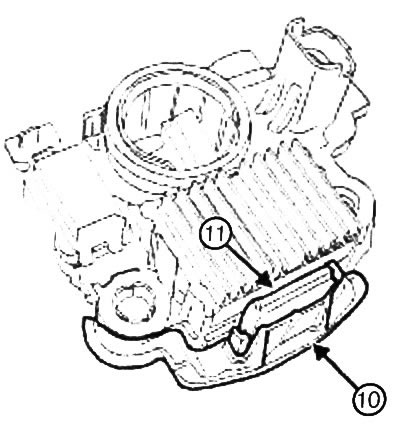
3. Remove:
- panel (10),
- protective cover (11).
4. Unsolder the connections of the brush holder of one brush, then the other.
5. Remove the brushes with springs.
6. Check the degree of wear of each brush.
Replace brushes if:
- the working length of the brush is less than 15 mm,
- the brushes are worn at the edges,
- the brushes have cracks.
7. Clean the brushes and their mounts, removing soot particles with a clean cloth.
8. Install brushes with springs.
9. Solder the connections of the brush holder of one brush, then the other.
10. Make sure the brushes move freely in the mounts.
11. Make sure that the brush springs work correctly and quickly: when you press the brushes down with your finger, they should move freely in the mounts, and when you release your finger, they should return to their original position under the influence of the springs.
12. Install:
- voltage regulator (see "Replacing the voltage regulator").
- front bearing, pulley and rotor assembly to the stator - rear bearing unit (see "Replacing the rotor").
13. Check the correct operation of the generator (see "Checking the generator").
Replacing the stator
1. Disconnect the front bearing, pulley and rotor assembly from the stator and rear bearing assembly using a flat-head screwdriver (see "Replacing the Rotor").
Note:
- To securely fix the stator winding terminals, use solder with a high melting point (230°C).
- Perform disconnection quickly (within no more than 5 seconds), using a soldering iron with a power of 180 - 270 V, since overheating of the diode causes its damage.
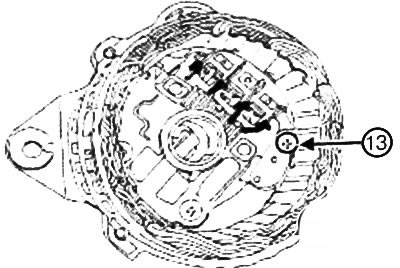
2. Unsolder the ends (12) of the stator winding.
Note: To avoid damaging the stator winding, do not insert the screwdriver further than 2 mm.
3. Remove the stator using a flat-head screwdriver.
4. Inspect the winding for color change.
5. Check:
- is there a connection between the stator winding and the "ground" by measuring the resistance between the stator "ground" and the ends of the winding: the resistance should be equal to infinity,
- winding resistance by measuring the resistance of each winding.
The resistance of each winding should be:
- 0.049 - 0.059Ω at 20°C for 70A generator,
- 0.044 - 0.054Ω at 20°C for 110A generator.
6. Install the stator on the rear bearing.
Note:
- To securely fix the stator winding terminals, use solder with a high melting point (230°C).
- Perform disconnection quickly (within no more than 5 seconds), using a soldering iron with a power of 180-270 V, since overheating of the diode causes its damage
7. Unsolder the ends of the stator winding.
8. Install the front bearing, pulley and rotor assembly onto the stator-rear bearing assembly (see "Replacing the rotor").
9. Check the correct operation of the generator (see "Checking the generator").
Replacing the bridge rectifier
1. Disconnect the front bearing, pulley and rotor assembly from the stator and rear bearing assembly using a flat-head screwdriver (see "Replacing the Rotor").
2. Remove:
- stator (see "Replacing the stator"),
- voltage regulator (see "Replacing the voltage regulator").
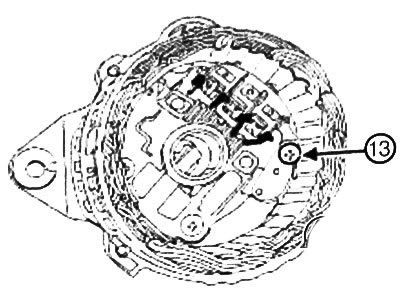
3. Unscrew the bolt (13) of the bridge rectifier.
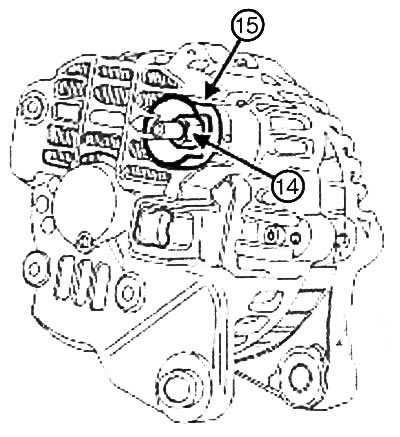
4. Remove:
- nut (14) from terminal B,
- insulator (15),
- bridge rectifier from rear bearing.
5. Check the conductivity between:
- heat sink (16) and each of the three terminals (17),
- negative contact (18) of the heat sink and each of the three terminals (17).
If the diode conducts in both directions, the diode is shorted: replace the bridge rectifier.
If the diode does not conduct in either direction, there is an open circuit in the diode: Replace the bridge rectifier.
6. Install:
- bridge rectifier for rear bearing,
- insulator,
- terminal nut B.
7. Tighten the terminal B nut to 16 Nm.
8. Tighten the bridge rectifier bolt.
9. Tighten the bridge rectifier bolt to 4 Nm.
10. Install:
- voltage regulator (see "Replacing the voltage regulator").
- stator (see "Replacing the stator"),
- front bearing, pulley and rotor assembly to the stator - rear bearing unit (see "Replacing the rotor").
11. Check the correct operation of the generator (see "Checking the generator").