



2. Remove the wheels, jack up the rear of the car and place it on axle stands.
3. Disconnect the brake drive cable.
4. Remove the spring clip (1) (see illustration) and knock out one of the guide pins (2) with a small punch. Then knock out the second guide pin. Do not unscrew the bolts (3).
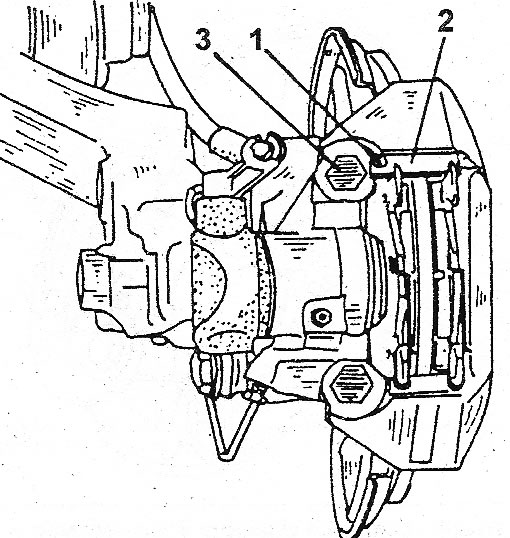
13.4 Removing and installing rear disc brakes 1. Spring clamp.; 2. Guide pin; 3. Fastening bolt
[View the original source on this resource renaultbook]
5. Remove the brake pads. Do not press the brake pedal again, otherwise the pistons may be pushed out of the channels. If the brake pads are to be reinstalled, mark them with alignment marks on the left and right, as well as inside and outside. Each brake pad has a support pin, which always protrudes upward. Check the condition of the protective boot and both sealing rings. If they need to be replaced, clean the end of the piston and both pins with brake fluid and lubricate with special grease. Install new rubber parts.
6. Perform the installation as follows:
7. Insert the piston into the cylinder channel. To do this, insert a screwdriver into the gap (see illustration) and screw the piston in until it stops. From this position, start unscrewing until the mark on the piston is in line with the bleed nipple plug.
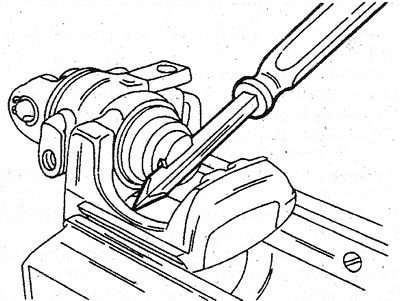
13.7 Screw the piston into the disc brake caliper cylinder. The line marked on the piston surface should be exactly above the bleeder plug
8. Attach both springs to the new brake pads, then place the brake pads on the brake disc (see illustration).
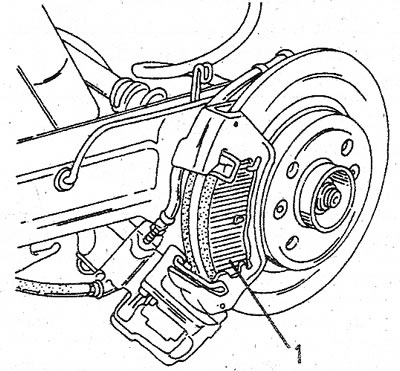
13.8 The support pin (1) of each brake shoe must be on the lower surface
9. Install the caliper and drive in the first guide pin (2) (see illustration 13.4). Secure the pin with a spring clip (1). The clip is installed on the inside of the caliper near the mounting bolt (3). Then move the caliper up and hammer in the second guide, pin.
10. After installation, press the brake pedal several times to press the brake pads against the disc.