



Contents: Removal 🠛 Installation 🠛
Removal
Note: Before working on the safety system components, it is necessary to block the airbag control unit using a diagnostic tool. This will block all ignition circuits and the airbag warning light on the instrument panel will light up continuously (with ignition on).
Note: When the airbag ECU is locked, the electric steering column lock is also unlocked.
Attention! It is strictly forbidden to work with pyrotechnic systems (airbags and seat belt pretensioners) near heat sources or open flames, as there is a risk of airbags or seat belt pretensioners deploying.
Disconnect the wires from the battery terminals, starting with the negative terminal.
Remove the center console.
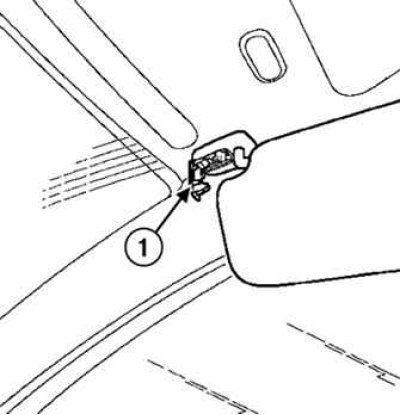
Fig. 7.58. Sun visor lock: 1 – retainer
Press the sun visor lock (Fig. 7.58).
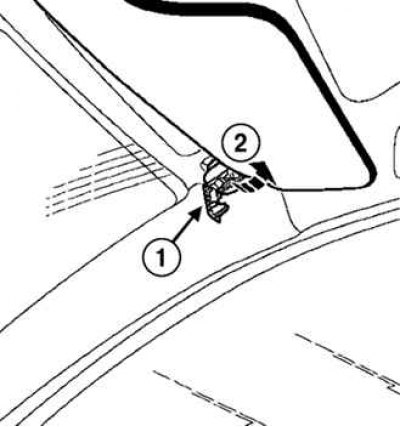
Fig. 7.59. Removing the sun visor: 1 – stopper; 2 – visor
Remove the stopper and sun visor (Fig. 7.59).
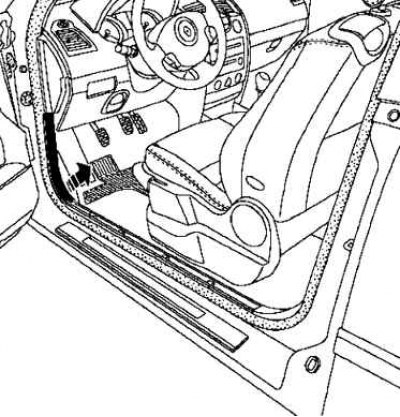
Fig. 7.60. Removing the front threshold trim
Remove the front threshold trim (Fig. 7.60).
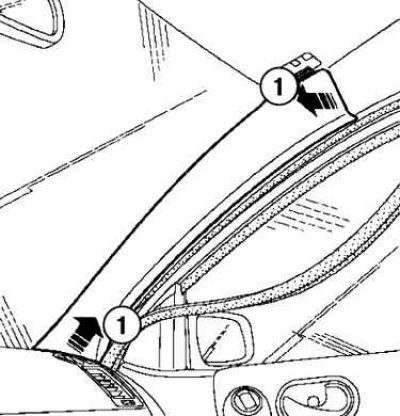
Fig. 7.61. Removing the windshield pillar trim: 1 – pillar trim
Remove the windshield pillar trim (Fig. 7.61).
Remove the high frequency speaker grilles and the speakers themselves.
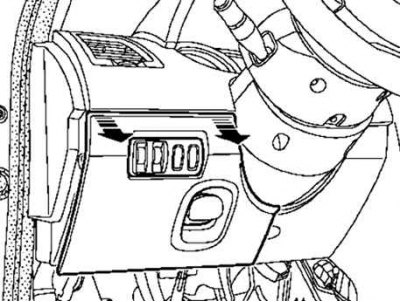
Fig. 7.62. Removing the lower casing access hatch cover
Remove the lower casing access hatch cover (Fig. 7.62).
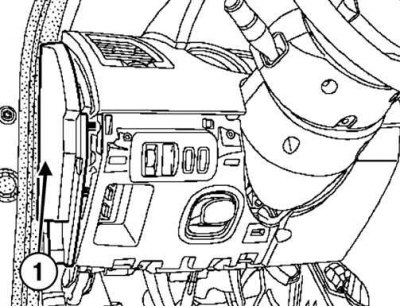
Fig. 7.63. Removing the side shield: 1 – shield
Remove the side shield (Fig. 7.63).
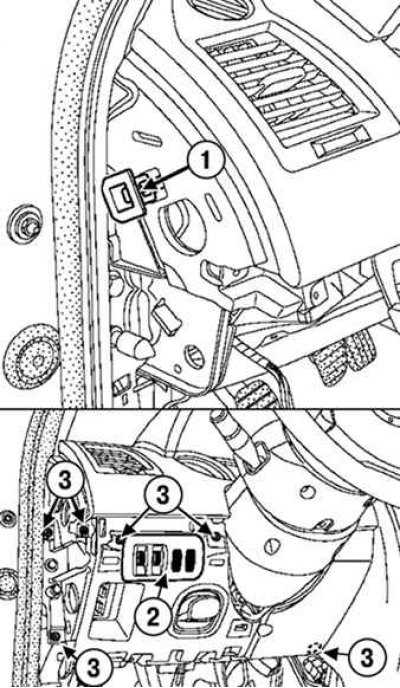
Fig. 7.64. Removing the headlight corrector switch panel and instrument lighting dimmer: 1 – stopper; 2 – screws; 3 – headlight corrector switch panel and instrument lighting brightness control panel
Loosen the screws, disconnect the stopper and remove the headlight corrector switch panel and instrument lighting dimmer (Fig. 7.64).
Attention! Stoppers must be replaced after each removal.
Turn the steering wheel half a turn to access the hole.
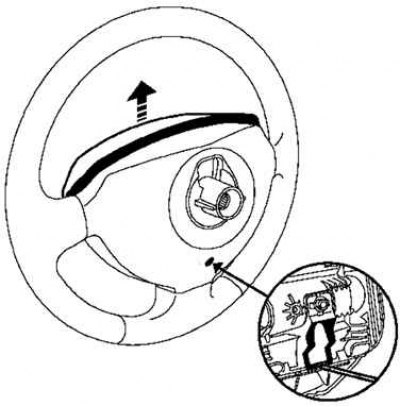
Fig. 7.65. Removing the steering wheel airbag capsule
Insert a screwdriver into the hole and remove the airbag capsule (Fig. 7.65).
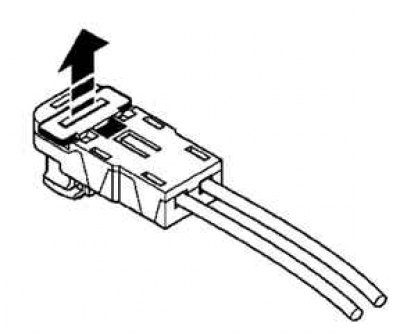
Fig. 7.66. Removing the airbag connector holder
Remove the airbag connector holder using a flat-blade screwdriver (Fig. 7.66).
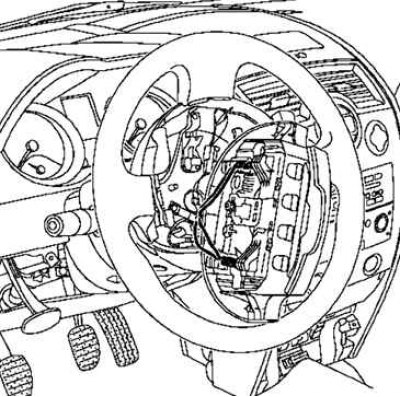
Fig. 7.67. Removing the airbag
Remove the driver's airbag from the steering wheel (Fig. 7.67).
Set the wheels to the straight ahead position.
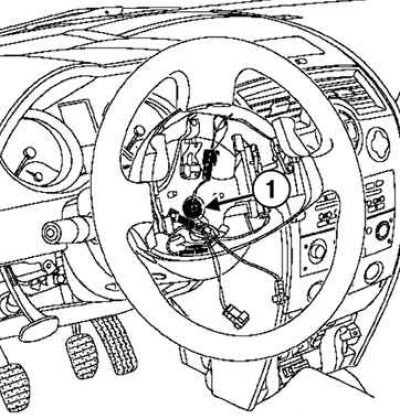
Fig. 7.68. Removing the steering wheel: 1 – mounting bolt
Unscrew the steering wheel mounting bolt and remove it (Fig. 7.68).
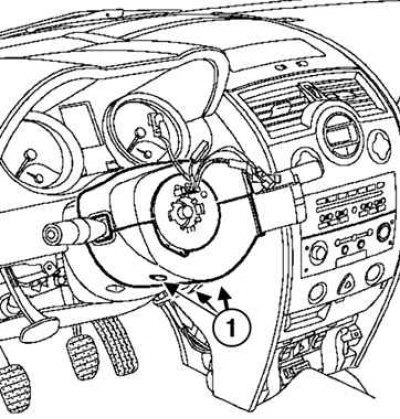
Fig. 7.69. Removing the steering column covers: 1 – mounting screws
Unscrew the three lower mounting screws and remove the upper and lower steering column covers (Fig. 7.69).
Mark the position of the steering column switch block.
Make sure that the mark on the contact disk is positioned opposite the pointer.
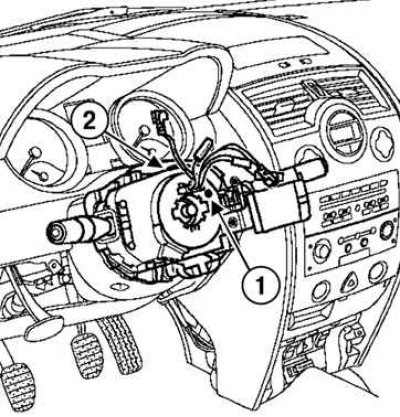
Fig. 7.70. Removing the steering column switch unit: 1 – label; 2 – fastening screw
Remove the steering column switch unit by unscrewing the mounting screw (Fig. 7.70).
Disconnect the unit from the steering column.
Disconnect the wire connectors (windshield wiper switch, audio system remote control, exterior lighting switch, turn signals and fog lights).
Disconnect the wiring harness from the contact disk.
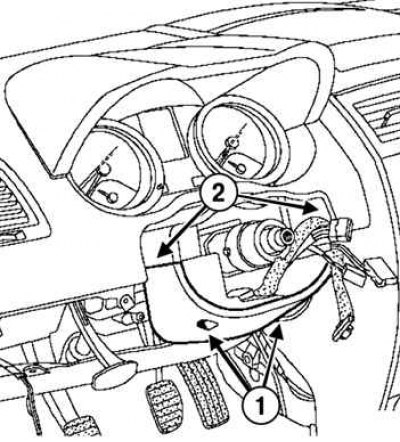
Fig. 7.71. Removing the second lower steering column cover: 1 – screws; 2 – upper clamps
Loosen the two screws, disconnect the two upper fasteners and remove the second lower steering column cover (Fig. 7.71).
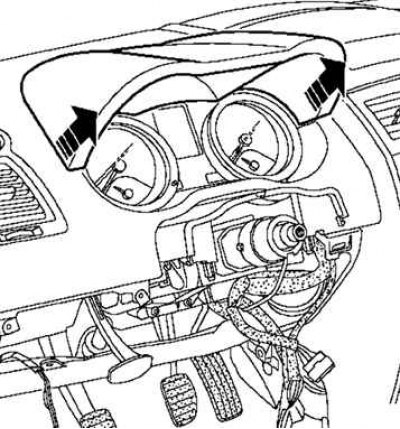
Fig. 7.72. Removing the instrument panel visor
Remove the instrument panel visor (Fig. 7.72).
Disconnect the Carminat navigation system connector (depending on the equipment level).
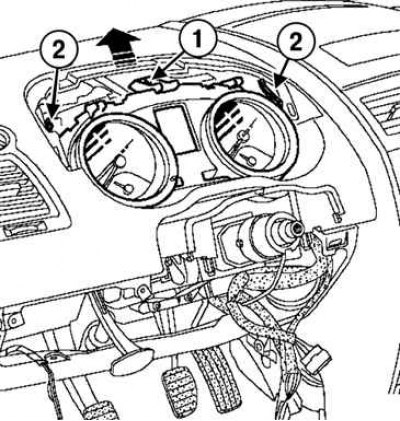
Fig. 7.73. Removing the instrument panel: 1 – screw; 2 – spring latches
Loosen the screw, press both spring latches and remove the instrument panel (Fig. 7.73).
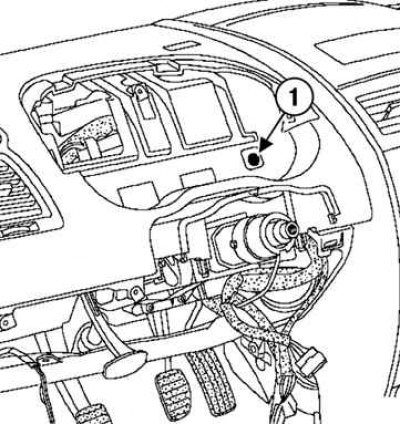
Fig. 7.74. Unscrewing the screw in the instrument cluster recess: 1 – screw
Unscrew the screw in the instrument cluster recess (Fig. 7.74).
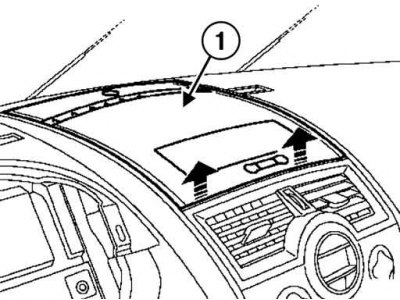
Fig. 7.75. Removing the top cover or display holder: 1 – top cover
Remove the top cover or display holder (car in basic configuration) (Fig. 7.75).
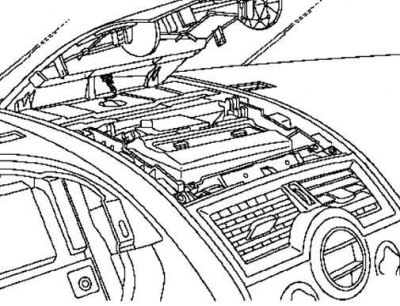
Fig. 7.76. Disconnecting the solar intensity sensor
Disconnect the solar intensity sensor (Fig. 7.76).
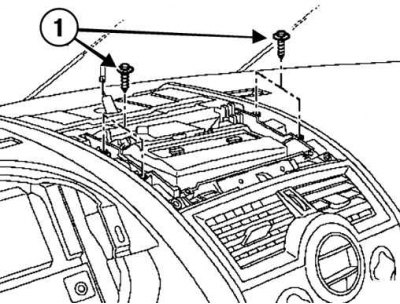
Fig. 7.77. Disconnecting the Carminat navigation system: 1 – mounting bolts
Remove the bolts and the Carminat navigation system screen (if it is installed) (Fig. 7.77).
Disconnect the connector.
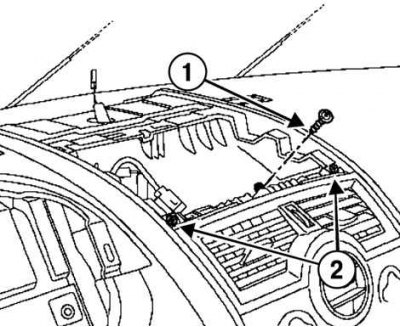
Fig. 7.78. Bolt and screws of the upper cover niche: 1 – bolt; 2 – screws
Unscrew the bolt and two screws in the recess of the top cover (Fig. 7.78).
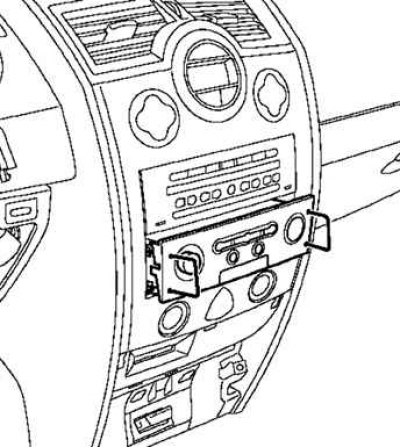
Fig. 7.79. Removing the Carminat system control panel
Remove the Carminat system control panel (if it is installed) using a special device (Ms. 1373) (Fig. 7.79).
Disconnect the connectors.
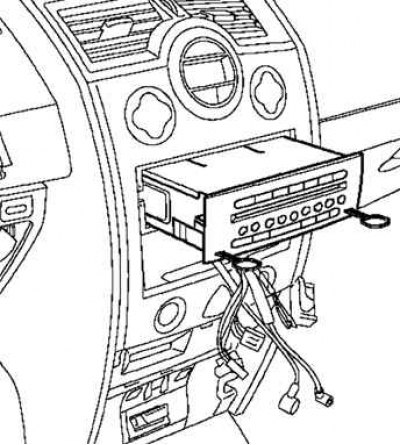
Fig. 7.80. Removing the audio system
Remove the audio system using a special tool (Ms. 1639) (Fig. 7.80).
Disconnect the connectors.
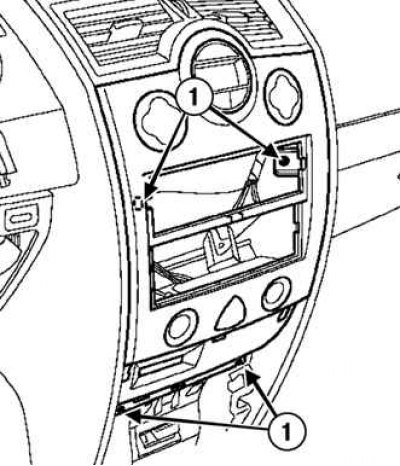
Fig. 7.81. Disconnecting the card reader bracket: 1 – mounting screws
Loosen the fastening screws and detach the card reader bracket using a special tool (Cag. 1597) (Fig. 7.81).
Disconnect the connectors.
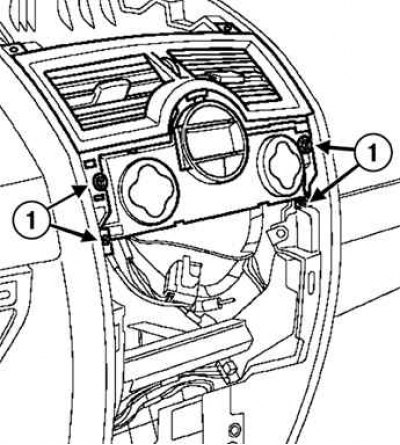
Fig. 7.82. Removing the central ventilation nozzle assembly with the climate control panel: 1 – mounting screws
Loosen the mounting screws and remove the central ventilation nozzle together with the climate control panel (Fig. 7.82).
Note: On vehicles without automatic climate control, remove the screws and disconnect the central ventilation outlet from the climate control or heating system control panel.
Remove the ventilation nozzle.
Place the climate control panel so that it does not interfere with removal of the instrument panel.
Disconnect the connectors.
Open the glove compartment.
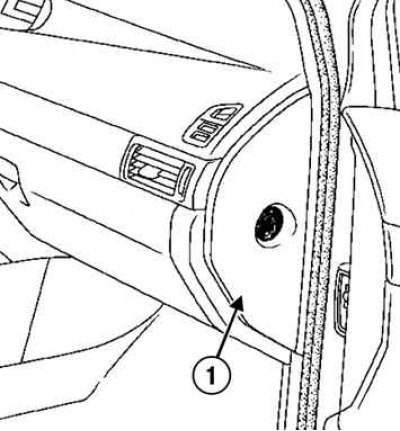
Fig. 7.83. Removing the side shield
Remove the side shield (Fig. 7.83).
Turn off the front passenger airbag cut-off switch.
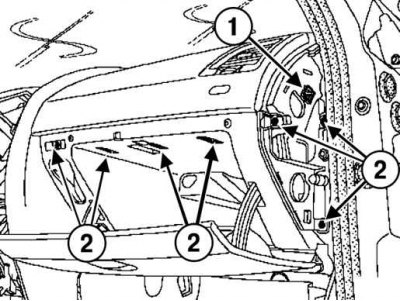
Fig. 7.84. Removing the glove compartment: 1 – stopper; 2 – mounting screws
Disconnect the stopper, unscrew the mounting screws and remove the glove box (Fig. 7.84).
Attention! Stoppers must be replaced after each removal.
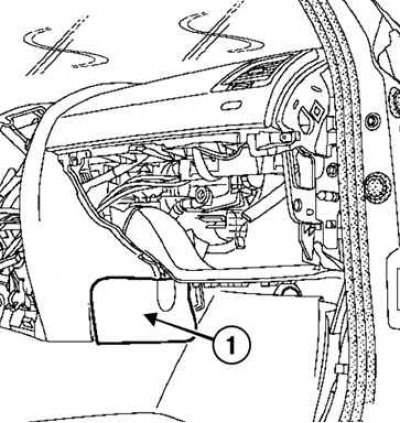
Fig. 7.85. Removing the bottom covers: 1 – lids
Remove the two lower covers (Fig. 7.85).
Disconnect the glove compartment light.
Disconnect the wires from the glove compartment light.
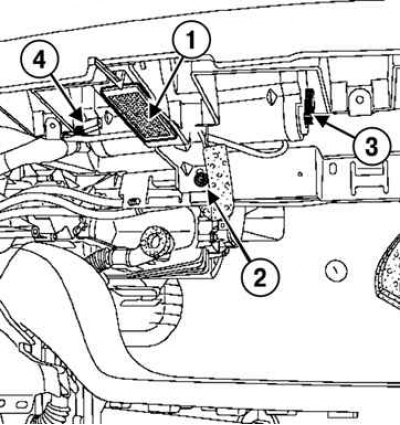
Fig. 7.86. Disconnecting power from the glove compartment lamp and from the passenger airbag: 1 – glove compartment lamp; 2 – fastening screw; 3 – wiring block; 4 – "ground" wire
(The text is available on this website renaultbook.ru)
Loosen the mounting screw, disconnect the wiring block from the passenger airbag and disconnect the airbag ground wire (Fig. 7.86).
Caution! Before removing the instrument panel, protect the wiring harness from damage. Please note: when removing the instrument panel, the gear shift lever at the bottom of the panel interferes with removal.
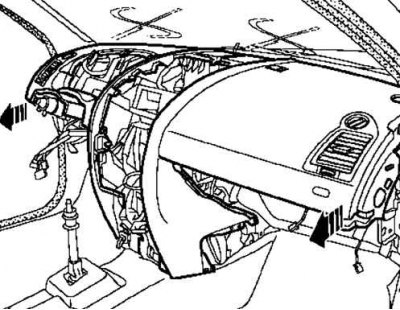
Fig. 7.87. Removing the instrument panel
Remove the instrument panel (this operation is performed by two people with an assistant) (Fig. 7.87).
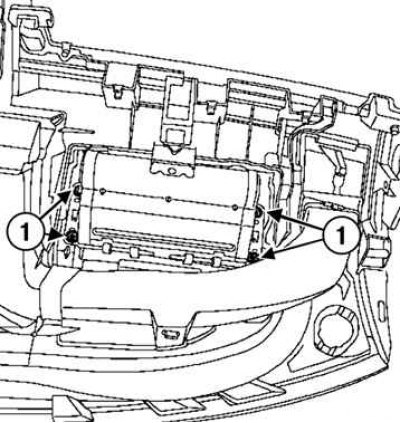
Fig. 7.88. Removing the passenger airbag module: 1 – fastening nuts
Loosen the mounting nuts and remove the airbag module (Fig. 7.88).
Installation
Caution: Whenever the passenger airbag is removed, be sure to replace the nuts that secure it to the instrument panel.
Tighten the airbag module mounting screws to the specified torque of 2 N·m.
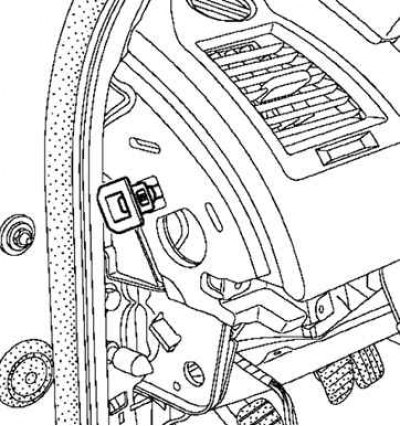
Fig. 7.89. Installing stoppers
Install two stoppers (Fig. 7.89).
Attention! Both stoppers must be replaced.
Before you begin installation, make sure the wheels are still in the straight ahead position and the steering column paddle shifter is aligned with the mark.
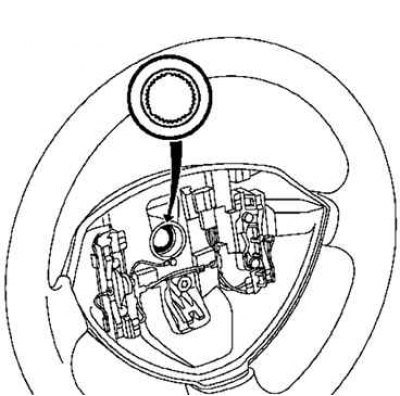
Fig. 7.90. Installing the steering wheel
The steering wheel should fit freely into the splines (the splines have orientation sections) (Fig. 7.90).
Be careful not to damage the splines of the orientation sections.
Be sure to replace the mounting bolt every time the steering wheel is removed.
Tighten the steering wheel mounting bolt to the specified torque of 440 N·m.
Caution! Check the airbag control unit with a diagnostic tool.
Caution: Check the wiring for cleanliness when installing the airbag module.
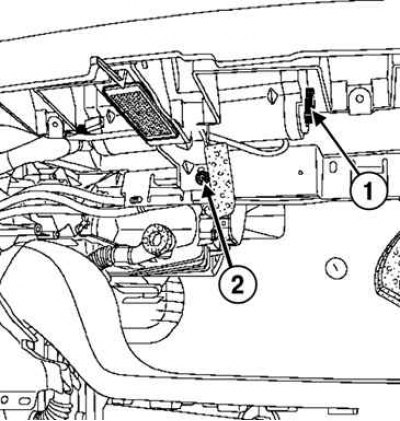
Fig. 7.91. Checking the reliability of the connection and locking of the airbag connectors: 1 – connection connectors; 2 – holder mounting screw
Check the reliability of the connection and locking of the airbag connectors (Fig. 7.91).
Connect the ground wire of the passenger airbag module.
Tighten the holder mounting screw to the specified torque of 20 Nm.
Caution: Unlock the airbag control unit using a diagnostic tool.
Connect the wires to the battery terminals, starting with the positive terminal; perform the necessary programming.
Tighten the battery cover mounting bolts to the specified torque of 4 N·m.
The installation of the remaining components is carried out in the reverse order of removal.