



Contents: Removal 🠛 Installation 🠛
Removal
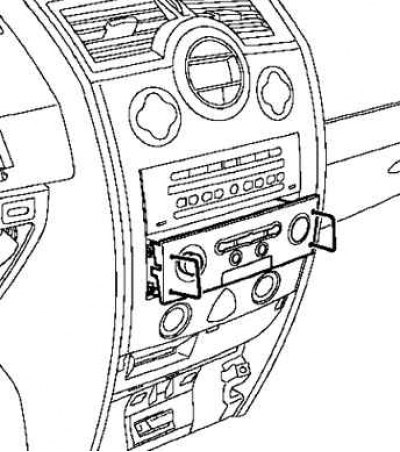
Fig. 7.94. Removing the central communication unit using a special tool
Take it off (if this equipment is installed on the vehicle):
- central communication unit using a special device (Ms. 1373) (Fig. 7.94).
- audio system using a special device (Ms. 1373);
- cD changer with special device (Ms. 1639);
- navigation unit with an audio system using a special device (Ms. 1544) (Fig. 7.95).
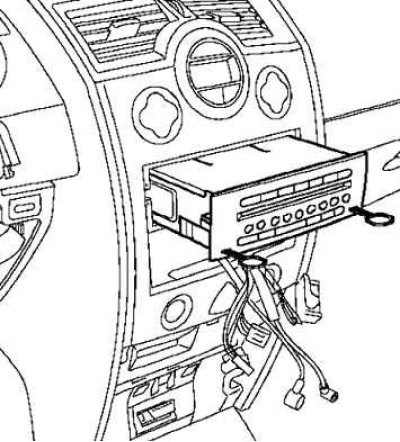
Fig. 7.95. Removing the navigation unit with the audio system using a special tool
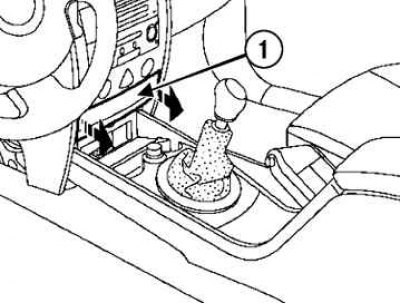
Fig. 7.96. Removing the card reader cover: 1 – lid
Remove the card reader cover by pressing the spring latches (Fig. 7.96).
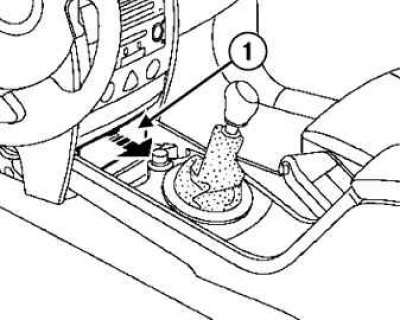
Fig. 7.97. Removing the diagnostic connector cover: 1 – lid
Remove the diagnostic connector cover by pressing the spring latches (Fig. 7.97).
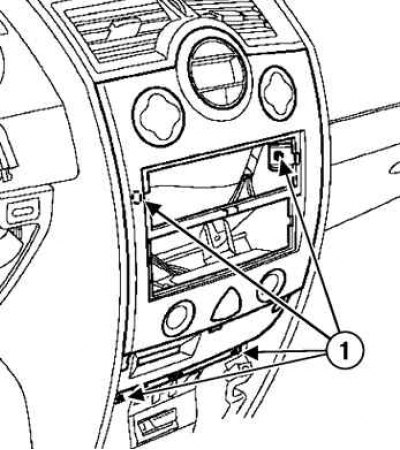
Fig. 7.98. Removing the front panel: 1 – mounting bolts
Loosen the bolts and remove the front panel by pressing the spring clips (Fig. 7.98).
Installation
Installation is carried out in the reverse order of removal.