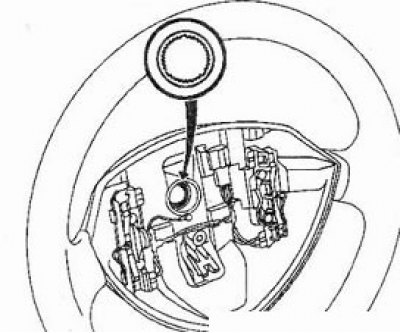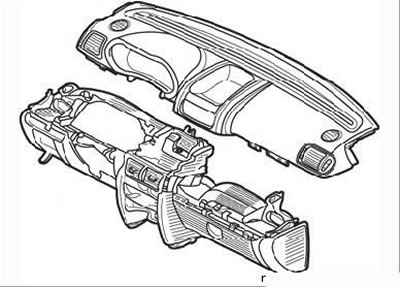
type 1 (Clio) |
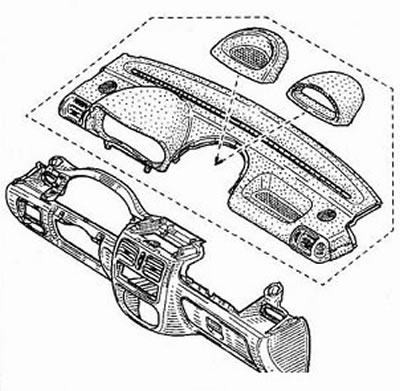
type 2 (Symbol) |
The instrument panel consists of two elements – the upper and lower parts.
Removal: Type 1 (Clio)
- disconnect the negative battery cable and wait at least 5 minutes for the airbag system to deactivate;
- remove the center console (see above);
- partially remove the door seal;
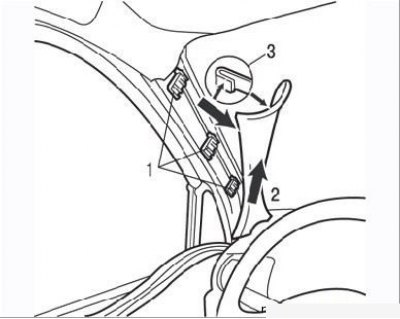
Figure 9.96. Removing the windshield pillar trim: 1 – clamps; 2 – groove on the instrument panel; 3 – trim latch
- move the top of the windshield pillar trim slightly to press the latch 3 (Figure 9.96);
- detach the trim from the clips 1;
- remove the trim from groove 2 on the front panel;
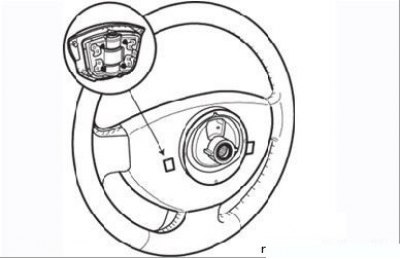
Figure 9.97. Removing the airbag module from the steering wheel
- using a flat-head screwdriver, remove the airbag module from the steering wheel by pressing the spring clips on the back of the hub (Figure 9.97);
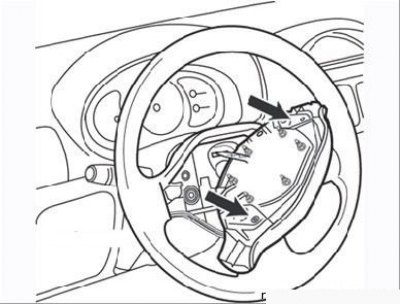
Figure 9.98. Airbag module connectors (arrows)
- disconnect the two connectors on the airbag module (Figure 9.98);
- set the front wheels to the straight ahead position;
- unscrew the steering wheel mounting bolt and remove it;
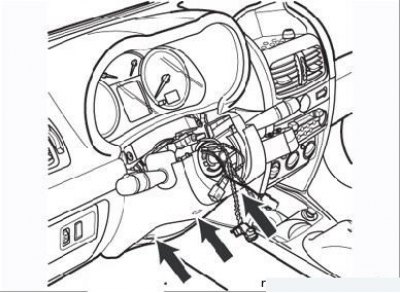
Figure 9.99. Steering column cover mounting screws
- unscrew the three screws securing the lower part of the steering column cover (Figure 9.99);
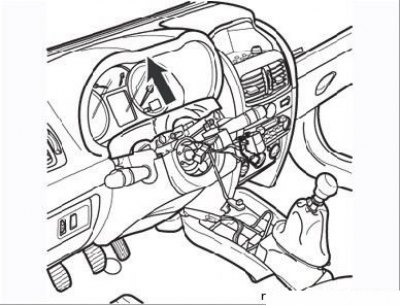
Figure 9.100. Removing the upper part of the steering column cover
- remove the upper part of the steering column cover as shown in Figure 9.100;
- remove the immobilizer ring antenna and the steering column switch unit as described in the section "Steering";
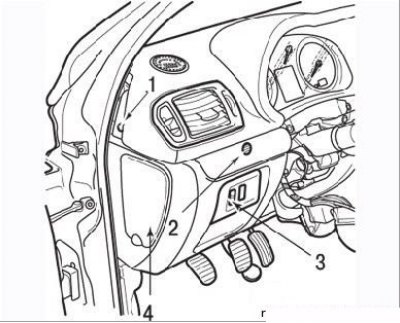
Figure 9.101. Fastenings of the upper part of the instrument panel: 1 – holder (left side); 2 – screw; 3 – headlight corrector regulator; 4 – fuse box cover
- remove two holders 1 (right and left) (Figure 9.101) front panel;
- remove the cover using the Car. 1597 tool and unscrew screw 2;
- using the Car. 1597 tool, detach the cover of the headlight corrector 3 and disconnect the contact connectors;
- remove the fuse box cover;
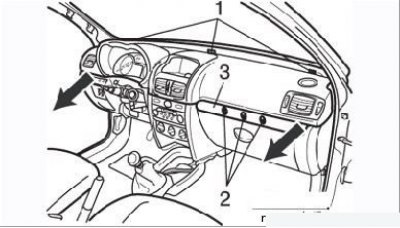
Figure 9.102. Screws 1 of the upper part of the instrument panel; screws 2 (located under the cover 3); arrows – direction of panel removal
- remove the three upper screws securing the top of the instrument panel (Figure 9.102);
- remove cover 3 using tool Car. 1597, unscrew three screws 2;
- pull the top of the front panel in the direction of the arrows;
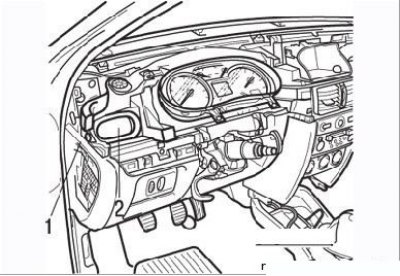
Figure 9.103. Instrument panel retainer (1) (left side): 2 – air duct
- remove the two fasteners on the right and left of the instrument panel (Figure 9.103);
- pull the air ducts towards you;
- remove the instrument cluster as shown below;
- disconnect the connectors of the two high-frequency speakers (tweeters);
- remove the glove compartment light bulb;
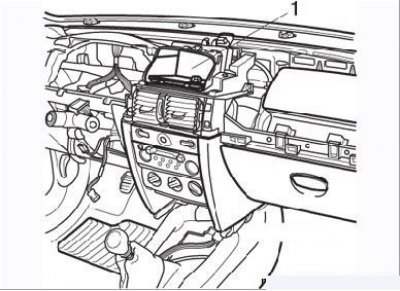
Figure 9.104. Slot (1) for Carminat navigation equipment keyboard or container for small items (depending on the configuration)
- using the Car. 1597 tool, press the spring clips and remove the Carminat navigation equipment keyboard (Figure 9.104) or a compartment for small items (depending on the configuration), disconnect the contact connectors;
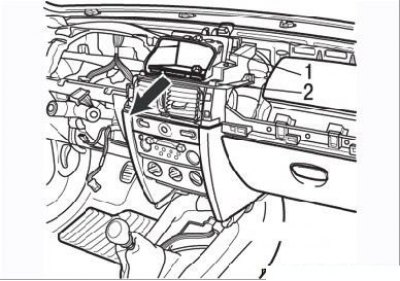
Figure 9.105. Removing the navigation system display: 1 – mounting screws; 2 – clamps
- remove two screws (Figure 9.105);
- press the two latches and remove the display or monitor of the Carminat navigation system, disconnect the contact connector;
- remove the car radio (see section "Electrical equipment");
- disconnect the heating and ventilation control switch holder and disconnect the contact connectors;
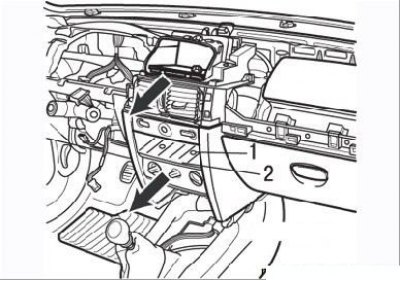
Figure 9.106. Cover (1) and two screws (2) for securing the heating and ventilation control panel
- remove the cover and remove the two screws securing the heating and ventilation control panel (Figure 9.106);
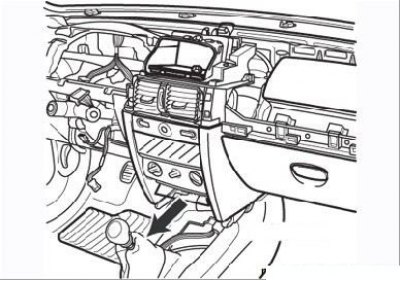
Figure 9.107. Removing the Carminat navigation system loudspeaker mounting bracket
(You can find the original at this link: RenaultBook.ru)
- remove the Carminat navigation system speaker mounting bracket (if it is installed) and disconnect the speaker connector (Figure 9.107);
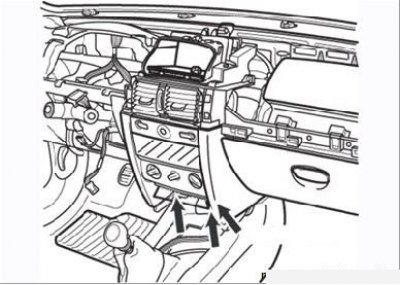
Figure 9.108. Screws for securing the lower part of the instrument panel
- remove the three screws securing the lower part of the instrument panel (Figure 9.108);
- remove the front passenger airbag by disconnecting the two airbag connectors;
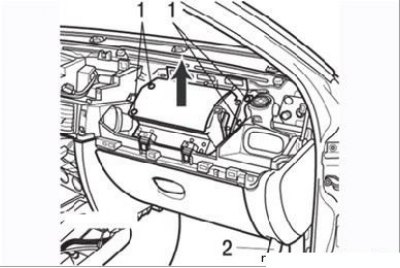
Figure 9.109. Front passenger airbag module mounting bolts (1) and lower right-hand instrument panel mounting screw (2)
- remove the four mounting bolts, then detach the airbag as shown in Figure 9.109;
- remove the two lower screws securing the front panel (right and left);
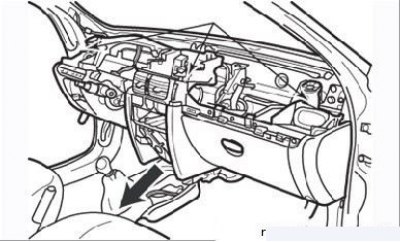
Figure 9.110. Screws for fastening the lower part of the instrument panel
- remove the three upper instrument panel mounting screws (Figure 9.110);
- lift the instrument panel slightly to remove it from the retaining tabs near the mounting screws. Check again that everything is disconnected (wiring, cables and hoses) and set aside from the panel;
- with the help of an assistant, carefully lift and remove the right side of the panel first, remove the panel from the passenger compartment through any front door;
- if there are difficulties when removing the panel, do not use force - check again whether everything is disconnected and whether the panel is caught on the surrounding body elements.
Installation
Installation is carried out in the reverse order of removal, taking into account the following:
- place the front panel against the engine shield and make sure that no wire, cable or hose is pinched;
- there should be no foreign objects in the airbag installation area (screws, latches, etc.);
- on the airbag side, fully connect the connectors and install the airbag retainers;
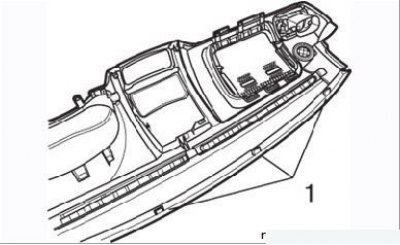
Figure 9.111. Fasteners (1) of the lower part of the instrument panel
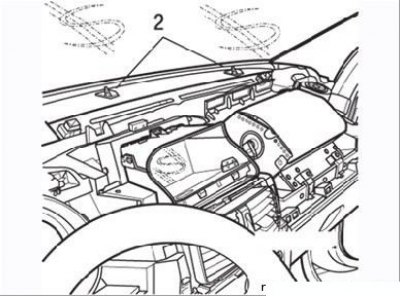
Figure 9.112. Fasteners (2) of the upper part of the instrument panel
- when installing the upper part of the instrument panel, check the condition of the fasteners (Figure 9.111 and 9.112). If the fasteners 1 show signs of damage, the upper part of the panel must be replaced. Fasteners 2 are supplied as spare parts and can be replaced;
- when installing the steering column switch unit, make sure that the front wheels are in the straight-ahead position;
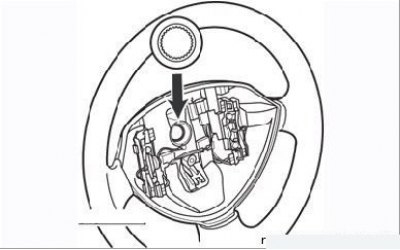
Figure 9.113. Steering wheel hub spline configuration
- when installing the steering wheel, please note that the steering wheel hub splines have a special configuration (Figure 9.113), protecting against incorrect connection. The steering wheel should fit freely onto the splines of the steering column. After each removal, be sure to replace the steering wheel bolt and tighten it to the specified torque;
- after final installation of the instrument panel, check the functioning of all elements installed on it.
Panel Removal: Type 2
Before removing the front panel, it is necessary to remove the steering column, see. "Steering".
Attention! Models with airbag.
- Do not place airbag units (driver or passenger) near a heat source or open flame: risk of spontaneous detonation of the device.
- only qualified personnel with sufficient skills to carry out the work are allowed to work with the passive safety system.
- Before removing the steering wheel, always disconnect the air bag unit connector (A) to prevent the unit from detonating by itself.
1. Disconnect the battery.
2. Models with airbag: Use a screwdriver to release the clips securing the airbag unit.
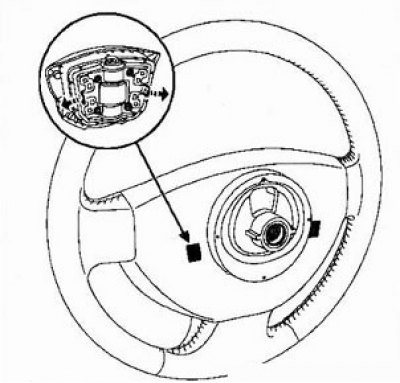
3. Models without airbag: Remove the steering wheel cover (clip fastening).
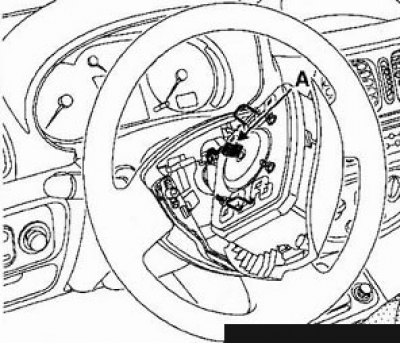
4. Loosen and discard the steering wheel mounting bolt.
5. Set the steering wheels to the straight-ahead position and remove the steering wheel.
6. Unscrew the three bolts securing the steering column covers and remove the covers.
7. Disconnect the wiper/washer switch and airbag unit current collector connectors (if installed). On models with airbag
8. Apply relative position marks to the halves of the current collector housing. Make sure that the steered wheels are in the straight-ahead position, the current collector connector is in the center of the steering wheel, and the "O" mark on the current collector is opposite the "E" reference mark.
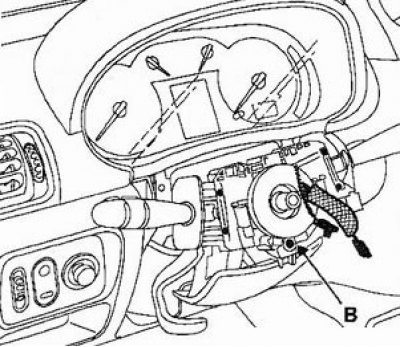
9. Loosen the bolt (B). Using a flat-head screwdriver, press the cone lock and remove the current collector.
10. Remove the gear shift lever boot.
11. Remove the ashtray.
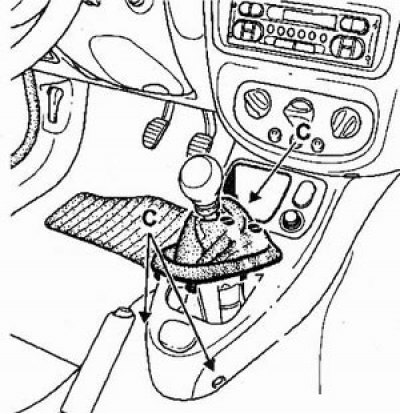
12. Loosen the bolts (C) of the front console, remove the front console.
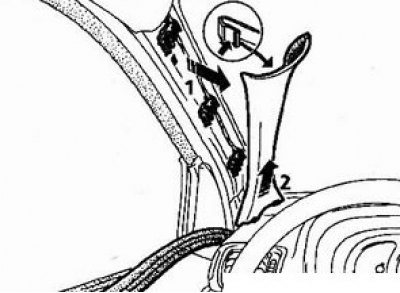
13. In the direction of arrows (1) and (2), remove the front A-pillar covers.
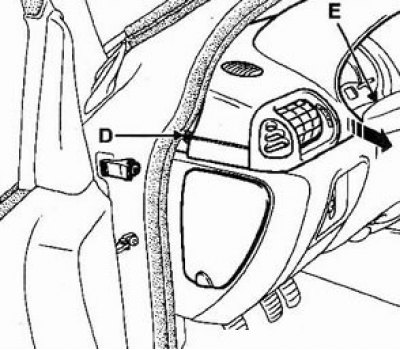
14. Remove the two side bolts (D) and two central bolts (E) securing the front panel trim.
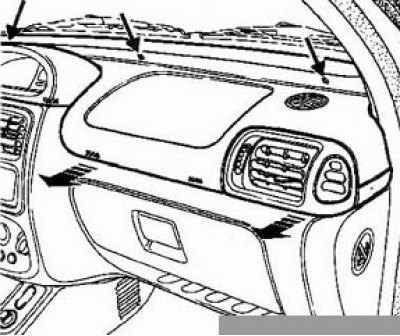
15. Unscrew the three upper bolts securing the front panel trim and remove the panel in the direction of the arrows.
16. Remove the immobilizer antenna (the antenna is located near the ignition switch).
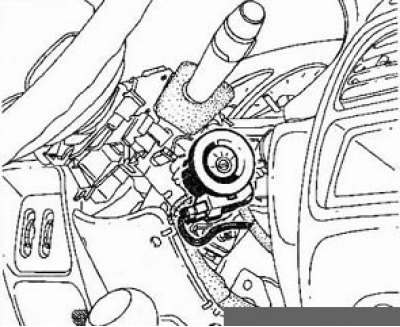
17. Unscrew the four instrument cluster mounting bolts, disconnect the connectors and remove the instrument cluster.
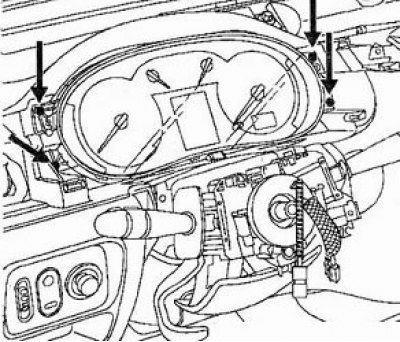
18. Disconnect the ignition switch connector.
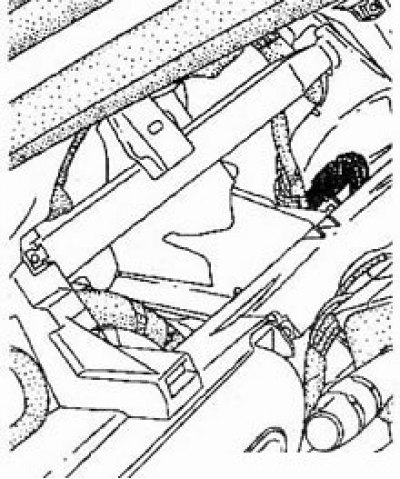
19. In the engine compartment:
- Remove the air intake duct.
- Loosen the expansion tank mounting bolts, remove the tank from the support and secure it to the side.
20. Loosen the bolt securing the steering shaft cardan joint to the steering gear.
21. Unscrew the six steering column mounting bolts. Pull out the engine compartment bulkhead boot.
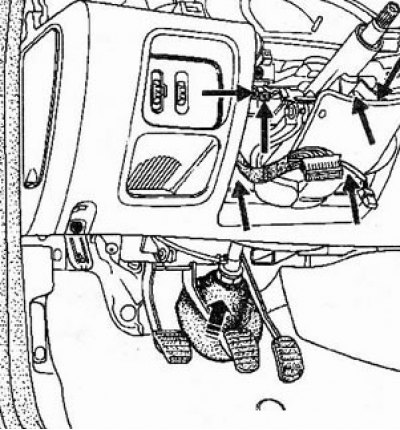
22. Remove the steering column.
23. Remove the cover of the fuse box in the passenger compartment.
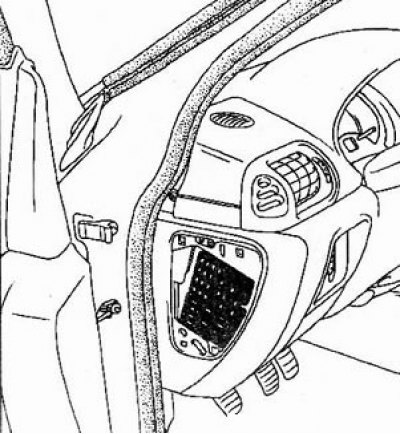
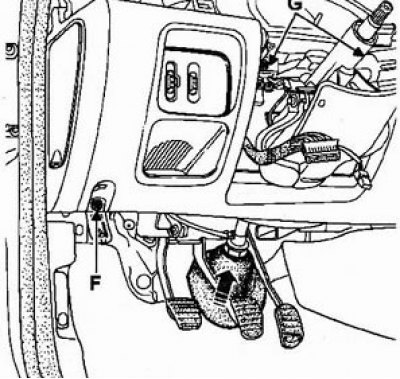
24. Remove the bolts (F) and (G) securing the front panel.
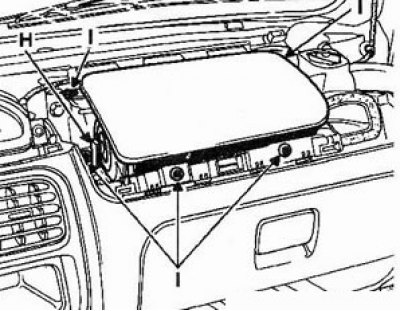
25. Models with airbag: Disconnect the connector (H) and remove the bolts (I) securing the passenger airbag.
26. Unscrew the two bolts (J) securing the heater control panel, remove the control panel from the front panel.
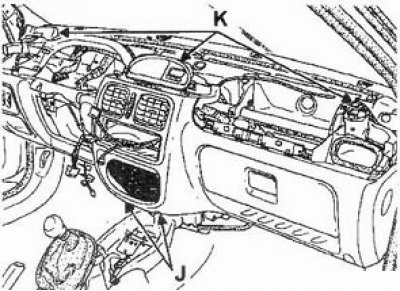
27. Unscrew the three bolts (K) securing the front panel.
28. Remove the radio.
29. Disconnect the center display connector (if installed).
30. Remove the bolt (L) securing the front panel.
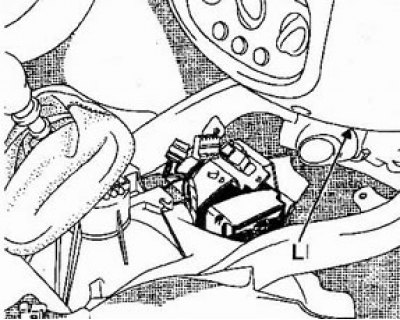
31. Lift the front panel until the guide pins installed next to the bolts (K) are released.
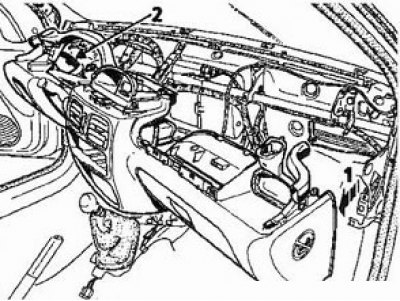
32. Pull the front panel in the direction of the arrow (1).
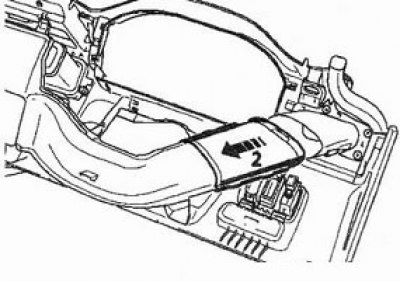
33. Move the air duct from the left side of the panel in the direction of the arrow (2).
34. Using two people, remove the front panel.
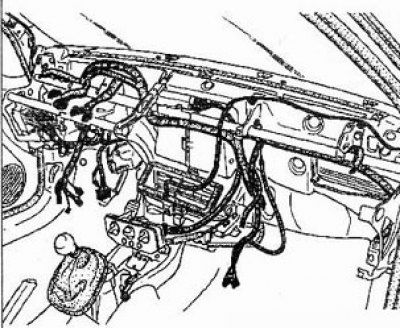
Installation
Installation is carried out in reverse order.
Note: Installation of the steering column is described in the section "Steering".
Notes during installation
Combination switch
Make sure the wheels are in a straight line position.
Check that the contact disk is installed in the center (2.5 turns in each direction).
Install the assembled unit onto the steering column and connect all connectors.
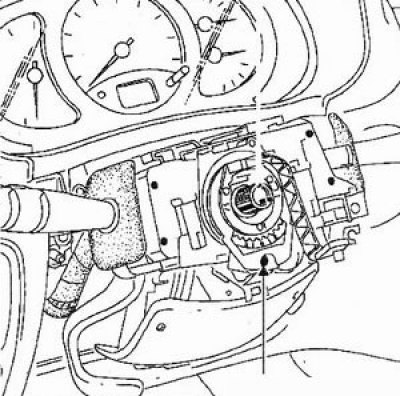
Complete the installation and tighten the "M" bolt only after both halves of the trim cover have been installed, while the lever switches must be installed without tilting relative to the instrument panel and dashboard.
This operation is made easier by a cutout in the lower casing, which provides access to the "M" bolt.
Replace the steering wheel mounting bolt with a new one after each removal (the new bolt has a microcapsule with glue).
Tightening torques
- Steering shaft cardan joint fork connection bolt - 25 Nm
- Steering wheel mounting bolt - 45 Nm
- Steering column mounting nuts - 20 Nm
- Airbag mounting bolt - 5 Nm
Passenger airbag
Check that there are no foreign objects in the airbag unit space.
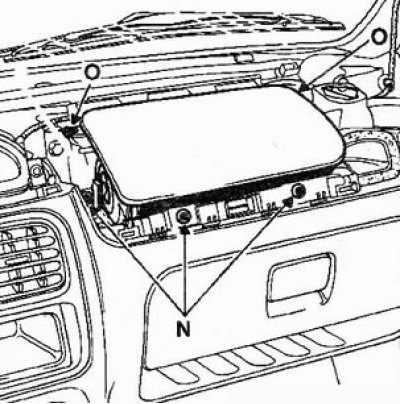
Securely connect the airbag PSU connector. Tighten the unit mounting bolts (N) to 6 Nm.
Steering wheel
The steering wheel splines are designed to ensure a clear fit of the steering wheel.
When installing, check the freedom of installation of the wheel along the sprockets. Do not reinstall the steering wheel mounting bolt.