



Removal
- disconnect the negative battery cable;
- remove the windshield pillar trim as described in the subsection "Dashboard";
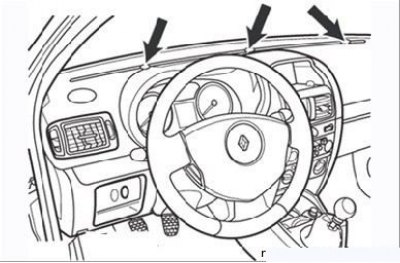
Figure 9.114. Screws for securing the upper part of the instrument panel
- remove the three screws securing the top of the instrument panel (Figure 9.114);
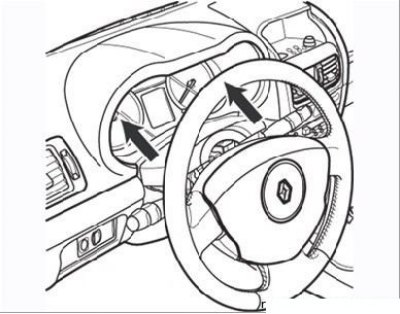
Figure 9.115. Removing the upper steering column cover
- remove the upper steering column trim cover (Figure 9.115);
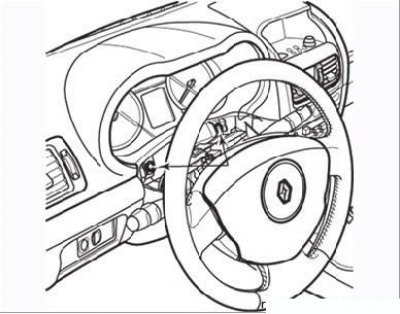
Figure 9.116. Instrument cluster mounting screws
- remove the two screws securing the instrument cluster (Figure 9.116);
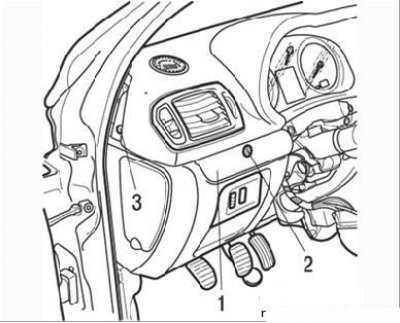
Figure 9.117. Steps for removing the upper part of the front panel: 1 – lid; 2, 3 – mounting screws
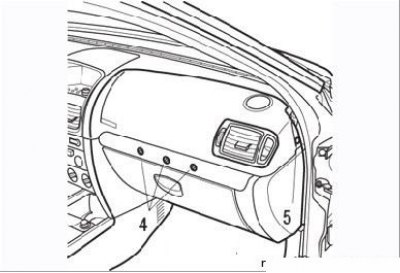
Figure 9.118. Fastening screws (4 and 5) of the upper part of the front panel
- remove cover 1 using tool Car. 1597 (Figure 9.117), remove screws 2 and 3 and screws 4 and 5 (Figure 9.118);
[You can find the original at this link RenaultBook]
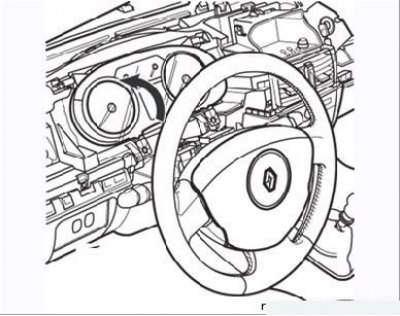
Figure 9.119. Removing the instrument cluster
- turn the instrument cluster as shown in Figure 9.119 and, after disconnecting the contact connectors, remove it from the vehicle.