



Note: Megane II vehicles are equipped with three types of instrument panels:
- - basic configuration;
- - intermediate configuration;
- - maximum configuration.
Self-diagnosis
All instrument panels have a self-diagnostic system.
To activate the self-diagnostic system, it is necessary:
- insert the card into the reader;
- press the button "ADAC" (control of data output to the on-board computer display);
- press and hold the engine start button (about 2 sec).
The instrument panel then goes into "self-test" mode, which includes:
- indication of the "self-test" mode;
- stepwise deflection of instrument needles;
- turning on all signal lights;
- highlighting all display segments;
- indication of the software version ("software product");
- indication of the amount of fuel measured in the tank (in liters);
- indication of hourly fuel consumption;
- display of stored faults or the message "check normal".
Note: To exit the self-diagnosis mode, press the odometer reset button.
Mileage until next oil change
Note: The fuel range and mileage until the next oil change parameters are entered using the diagnostic tool.
Entering the mileage until the next oil change.
Display the trip computer page "Oil change" on the screen.
Press and hold the trip odometer reset button.
The signal indicating the mileage remaining until the next oil change will start to flash, then the original value will be restored.
Release the reset button.
Thus, the countdown to the next oil change is initialized.
Display operation
1. Oil level indicator
This indicator lights up for approximately 30 seconds when the ignition is turned on or after the engine is started.
If the oil level is between the maximum and minimum values, the message "oil level normal" appears on the display.
If the odometer reset button is pressed within 30 seconds, the oil level is shown on the display using squares.
As the oil level decreases, the number of squares decreases and they are replaced by dashes.
If the oil level drops to the minimum permissible level, the display shows the message "bring the oil level up to normal", the oil level squares are completely replaced by dash symbols and the "service" signal lamp lights up on the instrument panel.
To proceed to reading the on-board computer parameters, press the engine start button again.
Note: Under normal operating conditions, the oil level is measured when the ignition remains off for more than one minute, otherwise the value obtained from the previous measurement is displayed.
Note: If a fault is detected in the oil level sensor, the mileage indication will immediately appear on the display when the ignition is turned on.
Note: It is normal for the oil level reading to fluctuate and may be affected by various factors:
- - parking a car on a slope;
- - too short a time has passed since the engine started and ran for a short time (especially if the oil is cold) etc.
2. Total mileage counter
Total and daily mileage counters.
The total and daily mileage counters are displayed on the display for approximately 30 seconds after the ignition is turned on (after displaying oil level information). Clicking on the "ADAC" button (button on the end of the windshield wiper switch lever) allows you to reduce waiting time.
The daily mileage counter is reset by pressing the "RAZ" (reset) button. Resetting the daily mileage counter differs from resetting the trip computer (distance traveled).
Note: It is not possible to reconfigure the display from kilometers to miles. To do this, you must replace the instrument cluster.
On-board computer
Data monitored by the trip computer is displayed instead of the odometer readings when the "ADAC" button is pressed (control of data output to the on-board computer display), located on the end of the windshield wiper switch lever. The daily mileage counter is reset by pressing the "RAZ" (Reset) button.
The trip computer information is displayed sequentially after the trip odometer readings in a specific sequence.
Fuel consumption (in liters) since the last reset
Average fuel consumption (in l/100 km) since the last reset.
This message appears on the display only after the vehicle has travelled approximately 400 m from the start of movement.
It takes into account the distance traveled and the amount of fuel consumed since the last reset.
Current fuel consumption (in l/100 km)
This indication appears on the display at speeds above 30 km/h (approximately).
When the accelerator pedal is fully released and the speed is above 30 km/h, the current fuel consumption is "zero".
Estimated range until next refueling (in km)
This message appears on the display only after the vehicle has travelled approximately 400 m from the start of movement.
This refers to the potential range, calculated based on the distance traveled, the amount of fuel in the tank and fuel consumption.
When the low fuel warning light is on, the fuel range is not displayed.
Distance traveled since last reset (average speed since last reset)
This message appears on the display only after the vehicle has travelled approximately 400 m from the start of movement.
Average speed is calculated by dividing the distance traveled by the time elapsed since the last reset.
All calculations are performed by the on-board computer.
The range before the next oil change shows the driver the distance (in km) that can be traveled before the next oil change.
Specified speed of movement
If the vehicle is equipped with a speed controller and speed limiter, the display shows the speed setpoint in (km/h).
Whenever the set speed value changes or in cases where this value cannot be maintained, this information replaces the information selected by the on-board computer.
Attention! If the on-board computer displays flashing dash symbols, a malfunction has been detected.
Table 7.2. Summary table of all instrument panel configurations
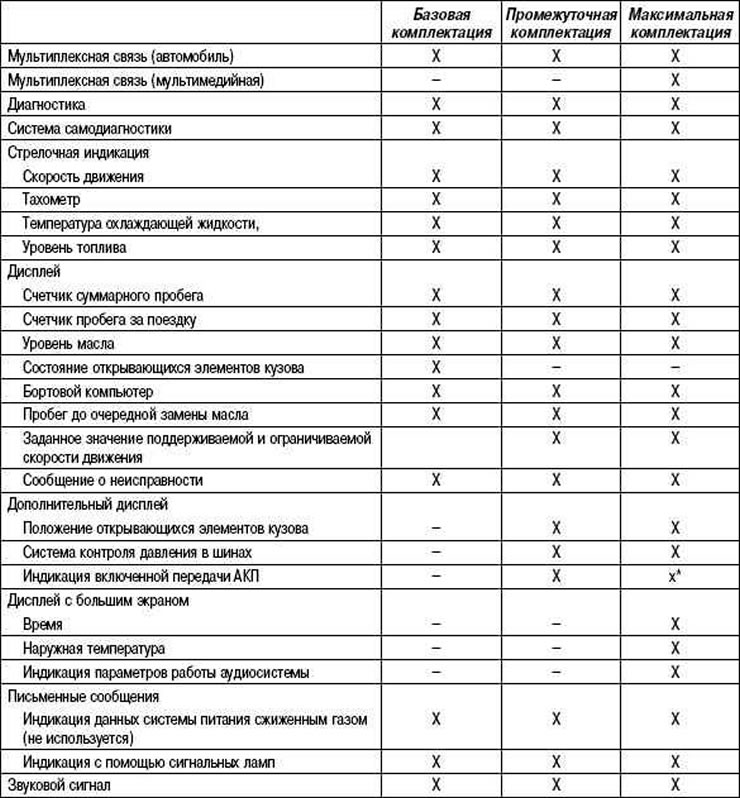
* Special instrument panel.
All models can be checked manually (self-diagnosis) and using a diagnostic tool.
Note: Do not disassemble the instrument cluster under any circumstances. Only glass replacement is permitted.
Table 7.3. Parameters and connection between the ECU and the instrument cluster
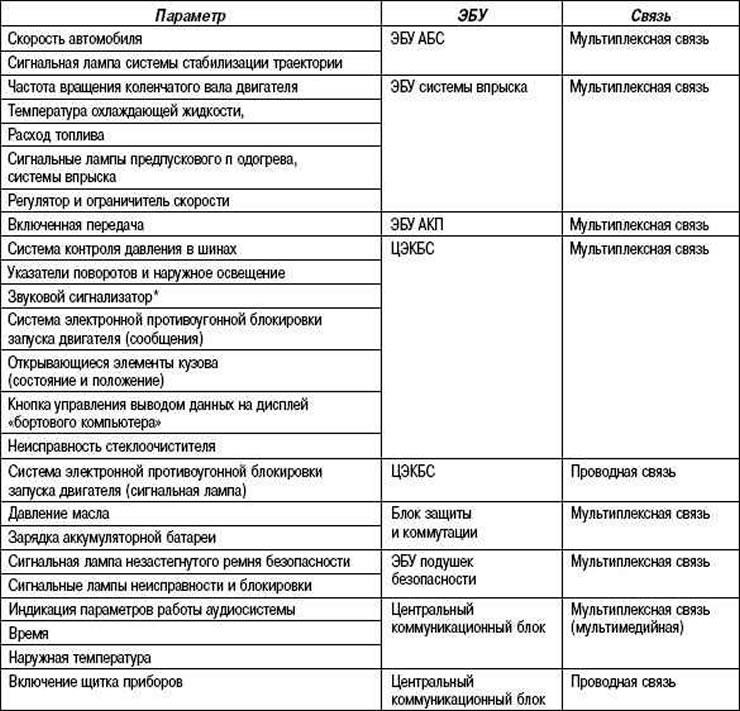
* The buzzer is used to confirm that the interior functions are switched on.