



The selected speed mode must match the existing road conditions. The device cannot be used in heavy traffic or in poor road conditions (ice, gravel, wet road, etc.).
It is recommended to use this mode on long and straight sections.
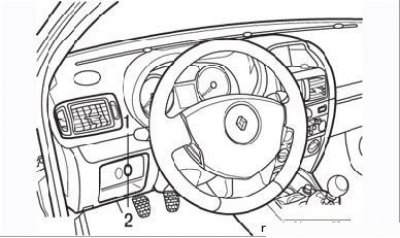
Figure 2.18. Location of the speed controller (1) and limiter (2) on the front instrument panel
The system is switched on by a three-position switch (Figure 2.18), located on the front panel of the passenger compartment. In this case, a green indicator lamp lights up in the instrument cluster. The system cannot be activated when the car is moving in first gear.
The desired constant speed value is selected by pressing the "+" or "-" switch on the left side of the steering wheel. When you press the accelerator pedal, the speed can be increased, but when you release the pedal, the speed will automatically return to the set speed.
To turn off the cruise control, press the brake or clutch pedals, or move the system switch on the instrument panel or steering wheel to the neutral position.
(Original of this article on the website: «renaultbook»)
The speed limiter allows the driver to set a maximum speed, after which pressing the accelerator pedal does not lead to further acceleration of the car. The system is activated by the same switch as the speed controller. The system is operating when the yellow lamp lights up in the instrument cluster. The system cannot be activated when the car is moving in first gear. The car speed must be between 30 and 200 km/h.
The desired speed limit is set by the "+" or "-" switch on the steering wheel. The selected speed limit can be exceeded by pressing the accelerator pedal sharply at any time (overcoming resistance). When you release the pedal, the speed will be set to the set level.
To turn off the speed limiter, set the switch on the instrument panel or steering wheel to the neutral position.