Contents: Removal the clutch 🠛 Clutch installation 🠛 Replacement 🠛 Automatic wear compensation mechanism 🠛
Tightening torque:
- Clutch basket mounting bolts - 20 Nm
Warning! Dust – a product of friction lining wear – may contain asbestos, which is hazardous to health. Do not blow it off with compressed air or inhale it. Do not use gasoline or gasoline-based solvents to remove dust. To remove dust, wash it off into a suitable container with a special clutch cleaning fluid or methyl alcohol.
The clutch can be removed if the entire power unit is dismantled and the gearbox is removed from it. It is also possible to remove the clutch when dismantling only the gearbox.
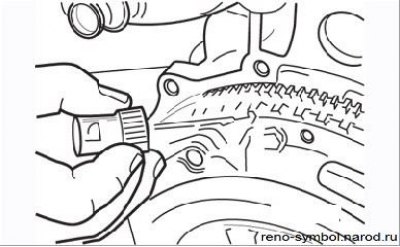
Figure 4.1. Applying marks to the clutch housing and flywheel
In both cases, it is necessary to apply marks that determine the relative positions of the clutch housing and the crankshaft flywheel (Figure 4.1).
Removal the clutch
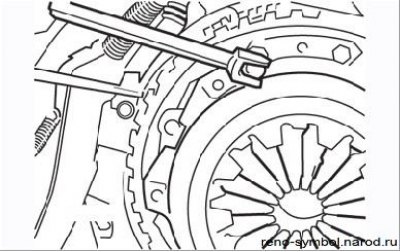
Figure 4.2. Unscrewing the bolts securing the clutch housing to the flywheel
- lock the flywheel with a wide-blade screwdriver and loosen the clutch housing mounting bolts in a diagonal sequence one to two turns per pass (Figure 4.2);
- remove the clutch housing from the guide bushings, being careful not to drop the driven clutch disc. Remember which side of the disc faces the flywheel;
- clean the clutch mechanism from dirt and dust, taking into account the warning at the beginning of the subsection.
Please perform the check as follows.
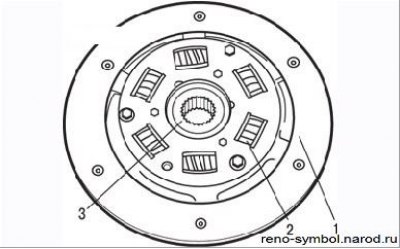
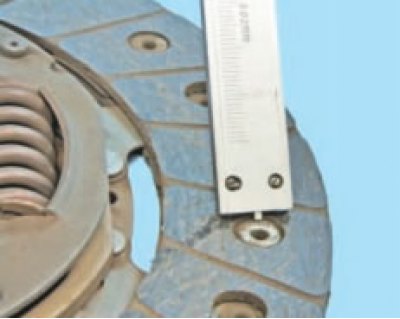
Figure 4.3. Checking the condition of the clutch driven disc by external inspection: 1 – friction lining; 2 – spring; 3 – hub
Inspect the contact surfaces of the clutch driven disc for signs of wear, spring damage, and contamination. If the friction material has cracks, burnt areas, pits, or is damaged by dirt or oil (shiny black spots), worn out, replace driven disk (Figure 4.3). Before installation, eliminate the source of oiling of the friction linings - this could be either the crankshaft oil seal or the gearbox input shaft oil seal.
It is better to entrust the replacement of the gearbox seal to specialists at the Renault service center, since it will require disassembling the gearbox and removing the clutch release guide sleeve from the bearing using a press.
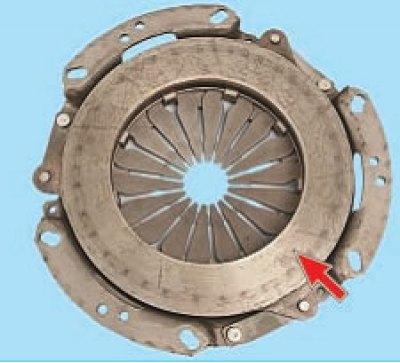
Figure 4.4. Checking the condition of the working surface of the pressure plate (arrow)
Check the machined surfaces of the flywheel and pressure plate. They should be absolutely flat, smooth, without burrs, traces of overheating and cracks. If damage is found that cannot be eliminated with sandpaper, replace the parts (Figure 4.4).
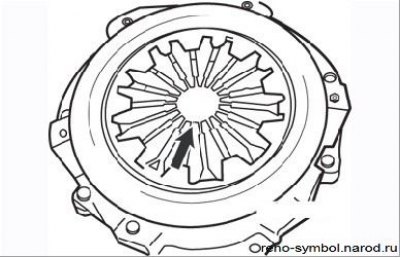
Figure 4.5. Checking the condition of the diaphragm spring petals (arrow)
The petals of the diaphragm spring must be in the same plane and not have significant wear (Figure 4.5).
Check the clutch release bearing. It should rotate smoothly and easily, with no signs of noise or binding; the contact surfaces must be smooth and undamaged, without cracks, burrs or dents. If you are in doubt about the good condition of the bearing, replace it.
Clutch installation
- clean the splines of the gearbox input shaft and apply a small amount of MOLYKOTE BR2 grease to them;
- lubricate the clutch release bearing guide bushing;
- when installing, make sure that the contact surfaces of the flywheel and discs are clean, smooth, dry and free of oil. Use a solvent to remove dirt from a new set. It is recommended to install the clutch with clean hands;
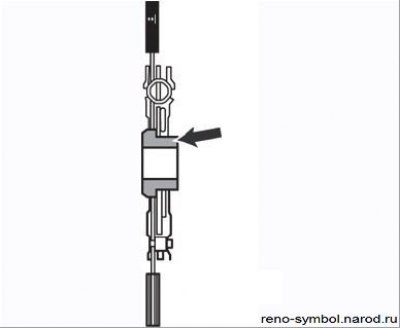
Figure 4.6. The protruding part of the driven disk hub should be facing the gearbox
- install the driven clutch disc on the gearbox input shaft so that the protruding part of the driven disc hub faces the gearbox (Figure 4.6);
- install the clutch housing, aligning the bushings and marks previously applied during removal. Screw in the housing mounting bolts, tightening them only by hand for now so that the driven disk can be moved;
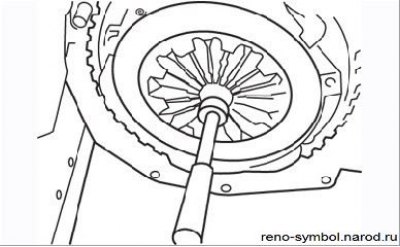
Figure 4.7. Centering the clutch driven disc using a mandrel
- center the driven disk using the mandrel supplied in the repair kit or made by yourself. To center the driven disk, move it slightly with the mandrel. Centering can be considered complete if the hole in the end of the crankshaft is located exactly in the middle of the hole in the hub of the driven disk (Figure 4.7);
- evenly tighten the clutch housing mounting bolts crosswise and tighten them to the required torque;
- remove the centering mandrel.
After installing the gearbox, connect the control cable to the release bearing fork and adjust the cable.
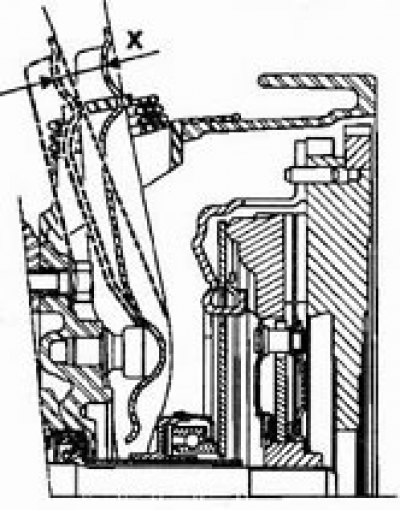
Check the clutch release stroke: stroke X should be 27.5-30.9 mm.
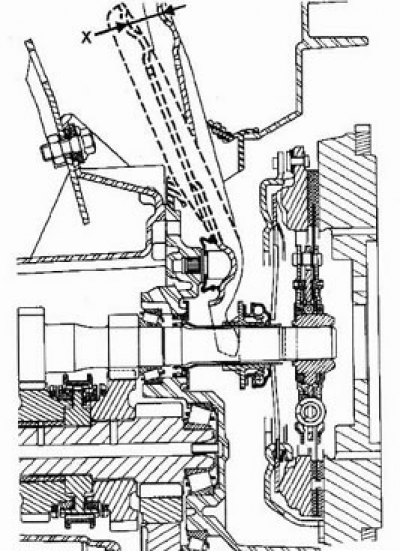
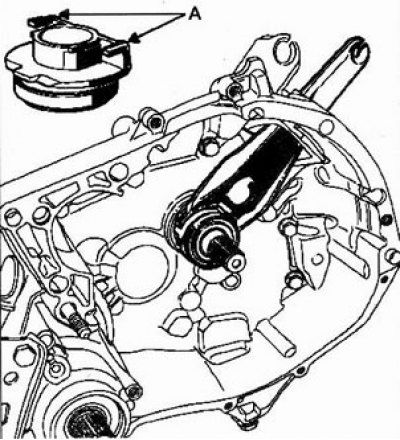
Note: When the gearbox is installed, never lift the release bearing fork to avoid the fork disengaging from the slots (A) of the bearing.
Special tool:
- Flywheel locking tool - Mot. 582 or 582-01
Tightening torque:
- Flywheel mounting bolts - 20 Nm + 60°
Replacement
1. Remove the clutch.
2. Loosen and discard the flywheel mounting bolts.
Note:
- Do not reinstall the flywheel mounting bolts.
- Restoration of the flywheel surface by mechanical treatment is not permitted.
3. Clean the threaded holes for installing the flywheel bolts in the crankshaft.
4. Remove grease from the bearing surface in the crankshaft.
5. Install the flywheel. Hand tighten the mounting bolts.
6. Lock the flywheel with locking tool Mot. 582.
7. Tighten the bolts in a diagonal sequence to a torque of 20 Nm and turn them further through an angle of 60°.
Note: Flywheel mounting bolts should be replaced periodically.
Automatic wear compensation mechanism
Special Notes
The wear compensation sector is driven by a ratchet pin.
The ratchet should return to the zero position freely.
The clutch release fork cable has a slack of about 2 cm.
The full stroke of the clutch release fork X is 27-30 mm.
Check the clutch release fork stroke before interfering with the clutch system.