
English Русский
Български
Беларускі
Український
Српски
Hrvatski
Română
Polski
Slovenský
Magyar
Bookmark Contacts Articles Sitemap
Company vehicles Peugeot Company vehicles Opel Company vehicles Skoda Company vehicles Land Rover Company vehicles Mitsubishi Company vehicles Volkswagen Company vehicles Honda
RenaultBook.ru


Duster   Fluence   Kangoo   Laguna   Logan   Megane   Sandero   Scenic   Symbol   Clio   Other
Megane 1 (1995-2002) Megan 2 (2002-2009, petrol)

Removal and installation the steering column (Renault Megane 2)

  • Main
  • Megane
  • Megan 2 (2002-2009, petrol)
  • Chassis, running gear
  • Steering
  • Removal and installation the steering column
0
Contents: Removal 🠛 Installation 🠛
Warning! Before performing any work on or near safety system components, be sure to disable the airbag control unit using a diagnostic tool. This will disable all ignition circuits and illuminate the airbag warning light on the instrument panel (with ignition on).


Note: This operation does not require the use of a car lift.


Removal


Place the vehicle's wheels in a straight-ahead position.

Disconnect the wires from the battery terminals, starting with the negative terminal.
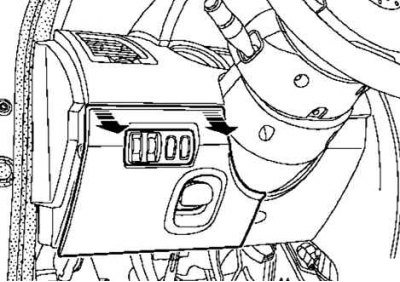
Fig. 5.7. Removing the lower casing access hatch cover

Fig. 5.7. Removing the lower casing access hatch cover


Remove the lower casing access hatch cover (Fig. 5.7).
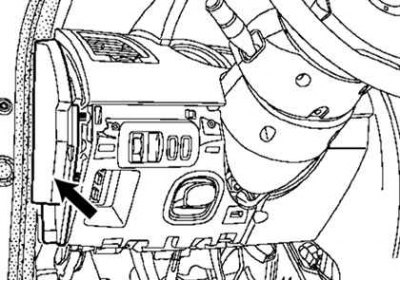
Fig. 5.8. Removing the side shield

Fig. 5.8. Removing the side shield


Remove the side shield (Fig. 5.8).
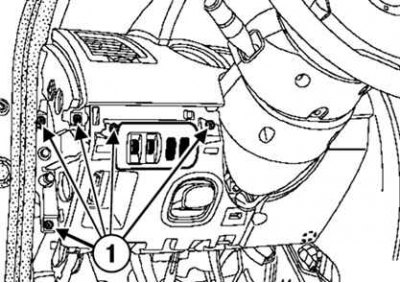


Fig. 5.9. Removing the lower casing: 1 – mounting screws

Fig. 5.9. Removing the lower casing: 1 – mounting screws


Unscrew the five screws securing the lower casing and remove it (Fig. 5.9).

Turn the steering wheel half a turn to access the hole at the bottom of the steering wheel.
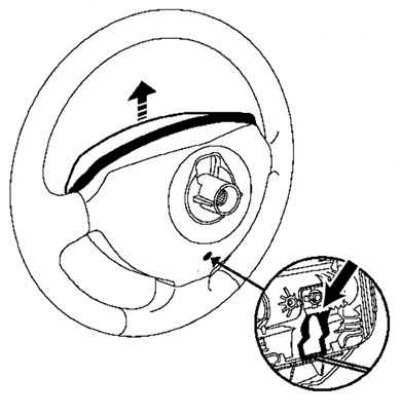
Fig. 5.10. Removing the airbag module

Fig. 5.10. Removing the airbag module


Insert a screwdriver into the hole, disconnect the clip shown by the arrow in Figure 5.10, and remove the airbag.
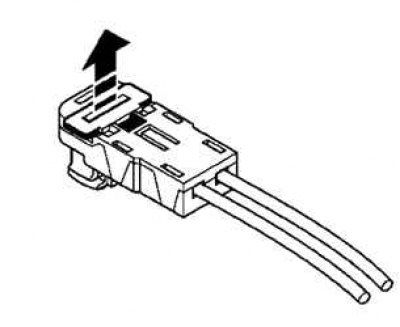
Fig. 5.11. Removing the airbag connector holder

Fig. 5.11. Removing the airbag connector holder


Remove the airbag connector holder using a flat-blade screwdriver (Fig. 5.11).
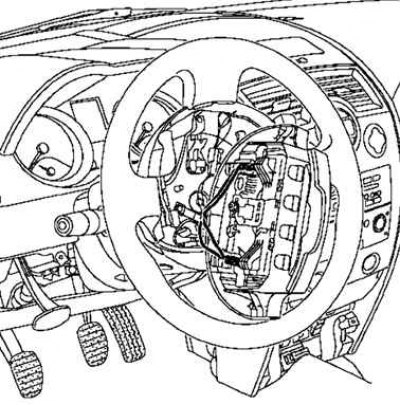
Fig. 5.12. Removing the airbag

Fig. 5.12. Removing the airbag


Remove the connector and the driver's airbag (Fig. 5.12).

Set the wheels to the straight ahead position.
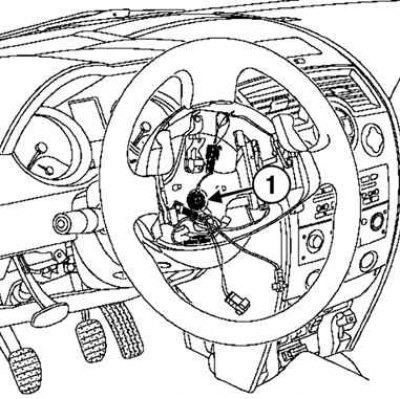
Fig. 5.13. Removing the steering wheel: 1 – mounting bolt

Fig. 5.13. Removing the steering wheel: 1 – mounting bolt


Unscrew the steering wheel mounting bolt and remove it (Fig. 5.13).
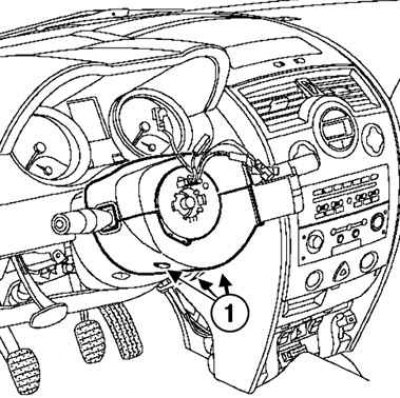
Fig. 5.14. Removing the upper and lower steering column covers: 1 – mounting screws

Fig. 5.14. Removing the upper and lower steering column covers: 1 – mounting screws


Unscrew the three lower screws and remove the upper and lower steering column covers (Fig. 5.14).

Mark the position of the steering column switch block.

Make sure that the mark on the contact disk is positioned opposite the pointer.
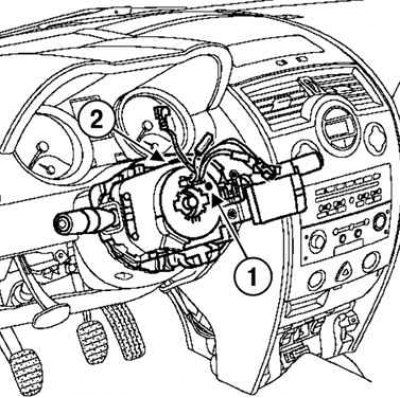
Fig. 5.15. Removing the steering column switch unit: 1 – label; 2 – fastening screw

Fig. 5.15. Removing the steering column switch unit: 1 – label; 2 – fastening screw


Remove the steering column switch assembly (Fig. 5.15).

Loosen the screw.

Disconnect the unit from the steering column.

Disconnect:
  • wiring blocks (windshield wiper switch, audio system remote control, exterior lighting switch, turn signals and fog lights);
  • the wiring harness from the contact disk.

Remove two screws.

Disconnect the two upper fasteners.
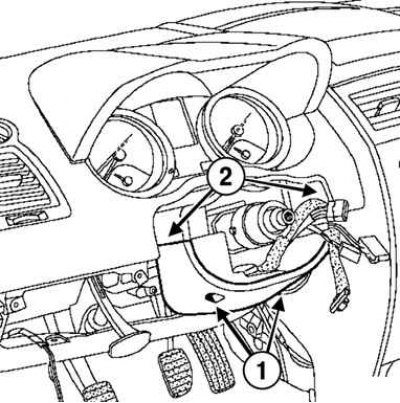
Fig. 5.16. Removing the second lower steering column cover: 1 – mounting screws; 2 – clamps

Fig. 5.16. Removing the second lower steering column cover: 1 – mounting screws; 2 – clamps


Remove the second lower steering column cover (Fig. 5.16).

Partially detach the top of the instrument cluster.
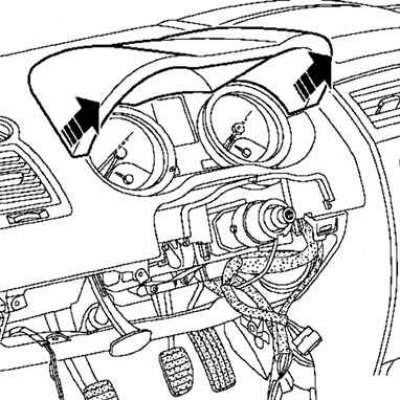
Fig. 5.17. Removing the top of the instrument panel

Fig. 5.17. Removing the top of the instrument panel


Disconnect the Carmi-nat navigation system connector (depending on the equipment level) (Fig. 5.17).
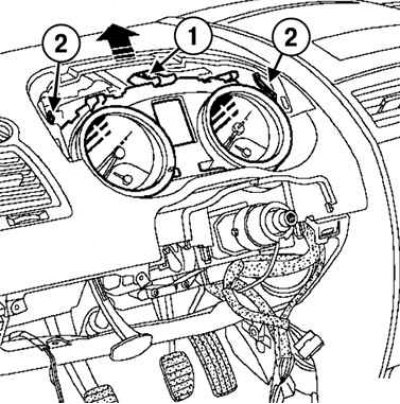
Fig. 5.18. Removing the instrument panel: 1 – screw; 2 – spring latches

Fig. 5.18. Removing the instrument panel: 1 – screw; 2 – spring latches


Loosen the screw, press both spring latches and remove the instrument panel (Fig. 5.18).
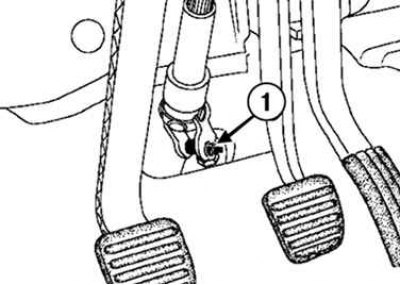
Fig. 5.19. Unscrewing the steering shaft cardan joint fork mounting bolt: 1 – mounting bolt

Fig. 5.19. Unscrewing the steering shaft cardan joint fork mounting bolt: 1 – mounting bolt


Loosen the bolt of the terminal connection of the cardan joint fork of the steering shaft (Fig. 5.19).

Remove the anti-theft device using a flat-blade screwdriver.
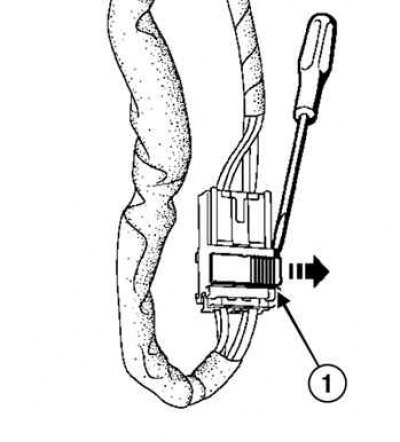
Fig. 5.20. Disconnecting the ignition switch connector: 1 – connector

Fig. 5.20. Disconnecting the ignition switch connector: 1 – connector


This note was copied from the resource [RenaultBook]

Disconnect the ignition switch connector using a flat-blade screwdriver (Fig. 5.20).
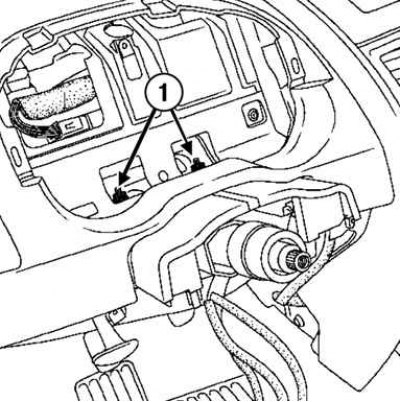
Fig. 5.21. Disconnecting the steering column fasteners from the instrument cluster side: 1 – nuts

Fig. 5.21. Disconnecting the steering column fasteners from the instrument cluster side: 1 – nuts


Unscrew the two nuts securing the steering column from the instrument cluster side (Fig. 5.21).
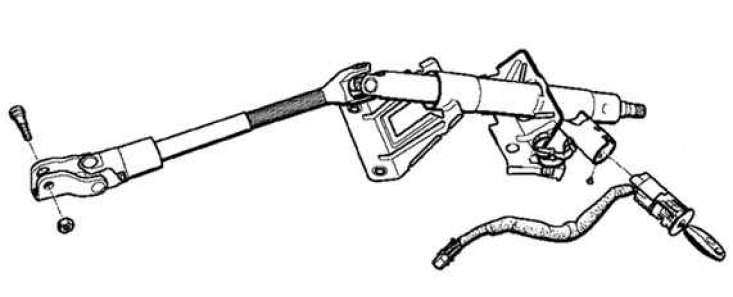
Fig. 5.22. Steering column

Fig. 5.22. Steering column


Remove the steering column (Fig. 5.22).

Installation


Installation is carried out in the reverse order of removal.

Attention! The steering wheel must fit freely into the splines (the splines have guide sections).


Caution! Be careful not to damage the splines of the orientation sections.


Caution: Be sure to replace the mounting bolt after each removal of the steering wheel.


Note: Be sure to replace the universal joint yoke bolt and eccentric nut after each removal.


Note: The new steering column has a steering shaft universal joint eccentric nut installed.
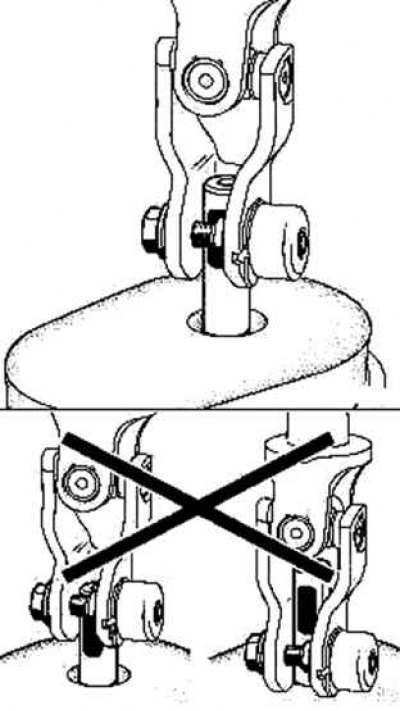

Fig. 5.23. Installing the bolt and eccentric nut of the steering shaft cardan joint fork

Fig. 5.23. Installing the bolt and eccentric nut of the steering shaft cardan joint fork


Observe the installation direction of the bolt and eccentric nut of the steering shaft universal joint fork (Fig. 5.23).

Tighten the eccentric nut and bolt.

Secure the terminal connection nut into the socket (hole on the steering shaft cardan joint fork).

Tighten to the specified torque:
  • steering column mounting nuts (21 Nm);
  • steering shaft universal joint fork terminal connection bolt (21 Nm).

Connect the wires to the battery terminals, starting with the positive terminal.


Perform a complete check using a diagnostic tool.

Delete from memory the faults that appeared as a result of the work performed, using the diagnostic device.
This article is available on: russian, bulgarian, belarusian, ukrainian, serbian, croatian, romanian, polish, slovak, hungarian
Article has been reviewed by editor: Kupriyanov Sergey
Share with friends:
Previous
Megan 2: Steering
Next

Checking the pressure in the electric power steering pump
Checking the pressure in the power steering circuit
Checking the steering wheel and steering column
General information about steering
Removal and installation the power steering pump
Replacing the power steering pump pulley
Checking the intermediate shaft
Removal and installation the seal in the front shield
Measuring the drift of a car on the road
Other articles on other Renault models

➽ Steering column switch Renault Duster 1 (2009-2017)
➽ Steering column adjustment Renault Fluence 1 (2009-2020, petrol)
➽ Steering column Renault Kangoo 1 (1997-2007)
➽ Removal and installation the steering column Renault Laguna 2 (2001-2007)
➽ Removal and installation the steering column Renault Logan 1 (2004-2012, petrol)
Link to this article in different formats
Reviews and comments of visitors
No comments yet


Add two numbers 33 + 34


Megan 2 (2002-2009, petrol) 
  • User manual
  • Introduction to manual
  • Controls and instruments
  • Salon equipment
  • Operation and driving
  • Maintenance and care
  • Power unit
  • Engine repair
  • Fuel system
  • Injection system
  • Intake and exhaust system
  • Starting and charging system
  • Cooling system
  • Decreased toxicity
  • Transmission
  • Clutch
  • Mechanical gearbox
  • Automatic gearbox
  • Wheel drive mechanism
  • Chassis, running gear
  • Suspension and wheels
  • Steering
  • Brake system
  • Body and interior
  • Exterior (external elements)
  • Interior (internal elements)
  • Doors, locks and windows
  • Heating and air conditioning
  • Electrical equipment
  • Equipment and devices
  • Headlights and lighting
  • Electrical circuits
Megane 1 (1995-2002) 
  • General information
  • User manual
  • Maintenance
  • Power unit
  • Petrol engines 1.4/1.6 l
  • Petrol engines 2.0 l
  • Diesel engines 1.9 l
  • Overhaul of engines
  • Cooling system
  • Fuel system (petrol)
  • Fuel system (diesel)
  • Decreased toxicity
  • Charge and launch systems
  • Ignition system (petrol)
  • Preheat system (diesel)
  • Transmission
  • Clutch
  • Mechanical gearbox
  • Automatic gearbox
  • Drive shafts
  • Chassis, running gear
  • Brake system
  • Car suspension
  • Steering
  • Body and interior
  • Exterior (external elements)
  • Interior (internal elements)
  • Doors, locks and windows
  • Electrical equipment
  • Equipment and devices
  • Electrical circuits
RenaultBook.ru © 2018–2026 | Mobile version | News and articles | Sitemap: EN BG BY UA RS HR RO PL SK HU | Administration | Site search | Bookmark
Duster 1 (2009-2017) | Fluence 1 (2009-2020, petrol) | Kangoo 1 (1997-2007) | Laguna 2 (2001-2007) | Logan 1 (2004-2012, petrol) | Logan 2 (2012-2020) | Megane 1 (1995-2002) | Megan 2 (2002-2009, petrol) | Sandero 1 (2007-2012, petrol) | Scenic 1 (1996-2003) | Symbol 1 (1999-2008, petrol) | Symbol 2 (2008-2013, petrol) | Renault 19 (1988-1996) | Espace I and II (1984-1996) | Espace III (1996-2002) | Clio 1 (1990-1998) |
We want your visit to be comfortable 😌 and use cookies 🍪 to do so.