



Contents: Selector 🠛 Driving in automatic mode 🠛 Driving in non-automated mode 🠛 Special traffic conditions 🠛 Stopping the car 🠛 Malfunctions 🠛
Selector
The display on the instrument cluster indicates the selected mode and the gear engaged.
- 4 — P: Parking.
- 5 — R: reverse.
- 6 — N: neutral position.
- 7 — D: automatic mode.
- 8 — manual mode.
- 9 — zone indicating the mode of the box or gear engaged manually.
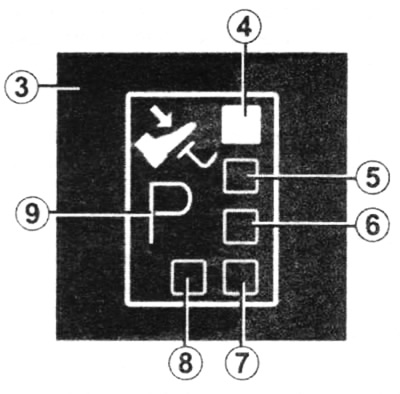
Automatic transmission selector lever range switching diagram
Driving in automatic mode
Move the selector to position D. In most cases, under normal driving conditions, you will no longer need to use the selector: gear shifting will occur automatically at the right time and at the optimum engine speed, since the "automatic" takes into account the vehicle load, road profile and the selected driving style.
Driving in non-automated mode
Place the selector lever in position D, then move it to the left.
You can change gears manually by successive movements of the selector:
- to downshift, move the selector backwards;
- to shift into a higher gear, move the selector forward.
The gear engaged is shown on the display.
Special traffic conditions
In some driving modes (for example, when the engine overload protection system, ESP system, etc. are operating.) the automatic transmission can automatically engage the required gear.
In addition, in order to avoid "false inclusions", the automatic transmission may refuse to change gears; in this case, the transmission indicator will flash for a few seconds to warn you of this.
If the road profile and its winding do not allow driving in automatic mode (for example, in the mountains), we recommend switching to manual gear shifting mode. This is necessary to avoid sequential gear shifts set by the automatic system on an incline and to ensure engine braking on long descents.
In very cold weather, to avoid stalling the engine, wait a short time before moving the selector lever from position P or N to position D or R.
If the vehicle is not equipped with an ESP system: on slippery roads or on roads whose surface does not provide reliable traction of the tires, to prevent slippage, switch to manual gear shifting mode and engage second gear when starting off.
Stopping the car
After the car has come to a complete stop, keep your foot on the brake pedal and move the selector to position P, which will put the gearbox into neutral and mechanically lock the drive wheels.
Caution: When the engine is cold, the idle speed is increased. Therefore, while the engine is not warmed up and is running at increased idle speed, be especially careful when engaging the ranges for moving forward or reverse.
Do not press the accelerator pedal hard when the vehicle is stationary or increase the engine speed to high values. This may cause the vehicle to move away unexpectedly.
Malfunctions
The appearance of the message "Check gearbox" while driving and the illumination of the service indicator light on the instrument panel indicate a malfunction.
[You can find the original at this link: RenaultBook]
Contact a service station as soon as possible. If the message "Gearbox overheating" appears while driving and the service indicator light comes on on the instrument panel, avoid leaving the selector in position D (or R) as much as driving conditions allow. When stopped, always return it to position N.
Contact a service station as soon as possible. When starting off, if the selector is locked in position P with the brake pedal depressed, it is possible to release the selector manually. To do this, detach the upper part of the cover at the base of the selector.
Simultaneously press the place indicated by the mark on the cover and the unlock button on the selector.
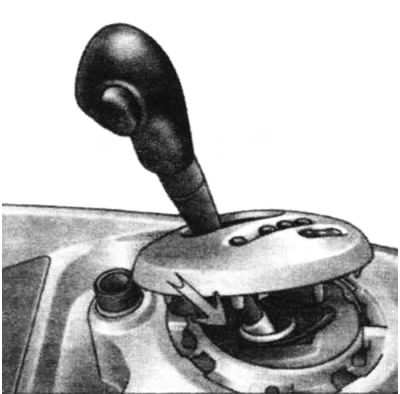
Selector release button