



Contents: Pushbutton switches 🠛 Removal pushbutton switches 🠛 Installing additional switches 🠛 Rotary switch 🠛 Toggle switches 🠛 Removal the toggle switches 🠛
The switches on the combination lever for turning on the headlights and direction indicators (L), and the front and rear window wipers (S) can be replaced or repaired individually.
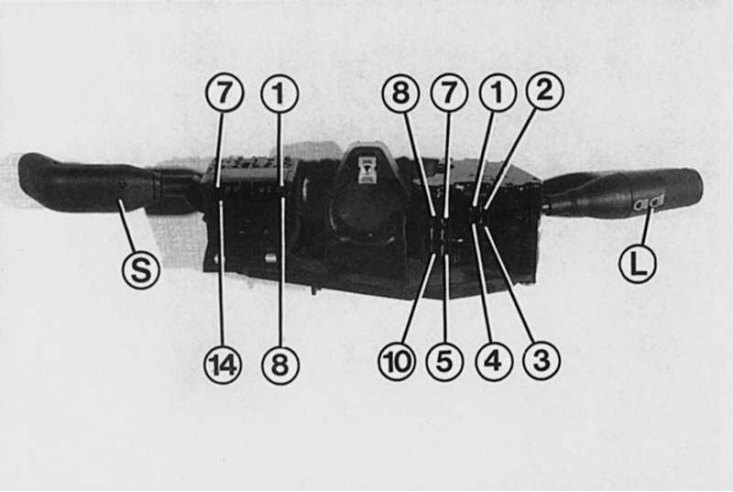
Wiring diagram for the wiper switch: 1 - "+" - windshield wiper; 2 - high speed; 3 - low speed; 4 - free; 5 - interval in front (slow); 6 - interval in front; 7 - final position of the windshield wiper; 8 - rear window wiper; 9 - final position of rear window wiper; 10 - "+" - rear window washer; 11 - windshield washer pump; 12 - rear window washer pump; 13 - on-board computer; 14 - injection system control lamp.
Wiring of contacts in the light switch and turn signal: 1 - low beam; 2 - dimensions; 3 - "+" - continuous load current; 4 - high beam headlights; 5 - right turn signals; 6 - light relay; 7 - left turn signals; 8 - "+" - continuous load current; 9 - rear fog light; 10 - "+" - sound signal siren.
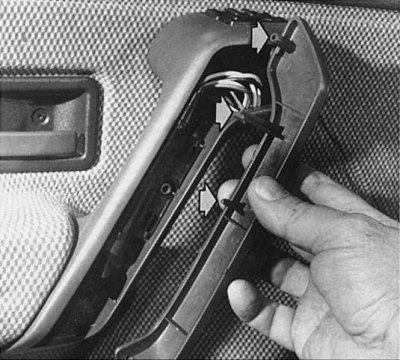
To access the pushbutton switches for the electric windows, you will need to remove the inner door handle trim. The switch can then be easily pushed up out of its socket. When installing the door handle trim, first put it on only from the bottom, and then insert the guides (shown by arrows) and press on it.
In order to use different current consumers, the Renault 19 is equipped with a certain number of different types of switches depending on the equipment variant. We distinguish between multifunctional lever switches on the left and right of the steering column, push-button switches (hazard warning lights, heated rear window, rear fog light, fog lights, central locking, electric windows, etc.) and a rotary switch for the cabin fan.
Pushbutton switches
- The push-button switches are located on the Renault 19 on the right, next to the steering wheel, below the radio. If the Renault 19 is equipped with push-button switches for the central lock and window lifters, they are additionally duplicated on the inner door handles.
- When the switch is pressed, its moving part drops and closes the electrical circuit.
Removal pushbutton switches
1. Using a thin screwdriver, squeeze the pressure springs located at the ends of the switch and partially remove the pushbutton switch from its socket. Be careful not to scratch the surface around the switch with the screwdriver that has come off (put a rag underneath).
2. Carefully remove the switch from the socket and disconnect the connectors located on it.
Installing additional switches
If, for example, fog lights are additionally installed, we definitely recommend installing the original switch with the corresponding connector.
1. Remove the plug from the unoccupied slot.
2. Install the plug on the wire according to the diagram.
3. Place the wire with the plug onto the switch socket.
4. Insert the switch into the free slot and check if it works.
(Original version on our portal: «RenaultBook»)
Rotary switch
The only rotary switch in Renault 19 is installed to control the interior fan. All maintenance and repair work on the fan and its switch can be found in the chapter "Heating and ventilation".
Toggle switches
Despite being the most frequently used, there are usually no problems with them in the Renault 19. Both combination switches are a single switch unit. The switch housing can only be opened by experienced car enthusiasts in the event of a malfunction. To determine the malfunction in the lever switches, it is enough to disassemble the upper and lower trim of the steering column.
Removal the toggle switches
1. Disassemble the upper and lower steering column trim (4 x TORX T20 screws).
2. Remove the steering wheel.
3. Unscrew the mounting screw located in the center of the switch block.
4. Disconnect all connectors.
5. Remove the switch block.
6. When installing in the reverse order of assembly, check the operation of the switches before installing the steering column trim.