



Contents: Replacement and configuration of the…🠛 Procedure for entering the code into…🠛 RENAULT card registration procedure 🠛 Entering the code into the injection…🠛
New UECs are supplied uncoded. Therefore, after installation in a vehicle, a code must be entered into them to ensure functionality.
To perform this procedure, it is necessary that the corresponding vehicle code has already been entered into some vehicle units. See the applicability table.
Attention! If any code is entered into a node, this node becomes registered for this vehicle and it is impossible to delete this code or enter another code. The entered code cannot be deleted.
Note: The card may have a vehicle code entered, but it may not be activated (not registered).
Only Renault cards that have undergone the registration procedure will be operational.
Replacement and configuration of the UEC
The new UEC is supplied uncoded. Therefore, after installation in the vehicle, a code must be entered into it to ensure functionality.
To perform this procedure, you must have at least one of the old Renault car codes registered for this vehicle and the aftermarket code. In addition, the 8 injection ECU must have the appropriate code entered (see applicability table).
Applicability table
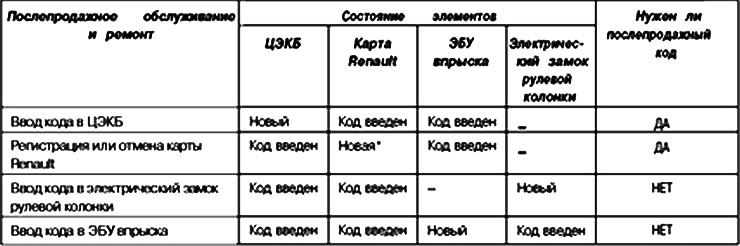
Attention! If a code is entered into the UEC, it becomes registered for this vehicle and it is impossible to erase this code or enter another code.
Only Renault cards that have undergone this procedure will be functional, provided that:
- the code of this car is entered into them;
- that they are new (uncoded).
Procedure for entering the code into the Central Electrification Bureau
Enter the dialogue mode with the Engine Start Immobilizer system.
In the "Commands" menu, "Special commands" confirm the line "SC027: entering the code in the UEC".
The display shows "Enter after-sales code".
Without inserting the Renault card into the reader, enter the secret after-sales code (12 characters in hexadecimal format) and confirm it.
If the code is correct, the display shows the message "Insert a card already registered for this vehicle" and the code entry procedure starts.
The display shows "Code entered in UEC", the code has been entered in UEC. Now you need to enter the Renault card registration mode to register other cards (but not more than four). It may take a few seconds for this message to appear.
Important! The interval between operations must not exceed 2 minutes, otherwise the procedure is cancelled and the message •Procedure interrupted appears on the device display: please note, cards are considered registered if registration was completed before the interrupted procedure began. Cards that participated in the interrupted registration procedure are considered used and can only be registered for this vehicle*. This message also appears in the event of loss of communication with the UCH or an open circuit in the battery circuit.
Special cases
If the screen displays:
- "remove the card from the reader" means that another card is already inserted into the reader;
- "check the aftermarket code and make sure the card is really from this vehicle": the code read is incorrect / or the code for another vehicle was entered in the UEC. Check the code, then re-enter;
- "you want to check the cards before registering them for this vehicle": the code for this vehicle has already been entered in the UEC, the UEC goes into the Renault card re-registration mode;
- "card cannot be used on this vehicle" card code does not match the vehicle;
- "The card you are using has not been used. Please use another card registered to this vehicle": use a card that has already been coded;
- "code not entered into the Central Electronics Center". Try repeating the entire procedure.
Attention! If the Renault card code is entered in the UEC, it is impossible to erase one and write another code in its place.
RENAULT card registration procedure
Note: You can determine whether the Renault card has been used by the status indication: "ET 115: card has not been used".
Attention! If at the moment all RENAULT cards are not available, then later it will be necessary to carry out the re-registration procedure for all car cards.
In the "Commands" menu, "Special commands" confirm the line "SC0001: card registration".
The screen displays "Do you want to check the cards before registering them for this vehicle?"
If a card check is required, the display will show "Insert the card into the reader in the Ignition II position". Insert the Renault card in the "ignition on" position:
- if registration is not possible, the screen displays "Check the after-sales code and make sure the card is really from this car". Use another card;
- if the card matches, the screen displays "Remove card from reader".
The display shows "Insert the card into the reader with the ignition on". Insert the Renault card into the reader and confirm:
- if the Renault card is not accepted, the red indicator light does not come on;
- if the Renault card is accepted, the red indicator light starts to flash quickly and the screen displays "1 card registered" and then "Remove the card from the reader".
The display shows "Insert the card into the reader with the ignition on". Insert the second Renault card into the ignition position.
Note: If the same Renault card is inserted twice, the system will ignore it and the electronic engine immobiliser warning light will not come on.
Insert the Renault card(s) intended for registration for this vehicle into the reader in the ignition position (no more than 4). The screen displays "2, 3 or 4 cards registered" and then "Remove card from reader".
Attention! These must be old Renault cards from this car or new Renault cards in which the code has not been entered.
Note: Only one Renault Hands-Free Card can be registered to a vehicle. If a second card is registered to a vehicle, it will function as a simple Renault Hands-Free Card.
Attention! The interval between operations must not exceed 5 minutes, otherwise the procedure is cancelled and the device displays the message "Procedure interrupted: please note, cards are considered registered if registration was completed before the interrupted procedure began. Cards that participated in the interrupted registration procedure are considered used and can only be registered for this vehicle". This message also appears if communication with the UEC is lost or the battery is disconnected.
Configure the UEC according to the functions and equipment of the vehicle.
Note: If only the UEC is replaced, no work needs to be done on the injection ECU: the previous code for the electronic engine start immobilizer system is stored in its memory.
Entering the code into the injection ECU
The injection ECU is supplied uncoded. To allow the car to start, the code for the electronic engine immobilizer system must be entered when installing it.
To do this, simply turn on the ignition for a few seconds without starting the engine. Turn off the ignition. The electronic engine start blocking system will be activated after a few seconds.
Examination
The state of the injection ECU can be determined using diagnostic tools.
Using a diagnostic tool.
1. Select and confirm "Passenger compartment switch unit".
2. Select the "STATUS" menu and check:
- if the code is not entered into the ECU, the state "ET 111 Injection ECU was not in operation" is activated:
- if the code is entered into the ECU, the status "ET 111 injection ECU was not in operation" is not confirmed.
Attention! On vehicles with this electronic engine start immobilizer system, the immobilizer system code is saved for the entire service life of the vehicle.
Also, this system does not have an unlock code.
In this regard, it is prohibited to carry out tests with injection ECUs received from the warehouse and subject to return.
The code you entered cannot be deleted.