



1. Low oil level indicator.
This indicator appears on the screen for approximately 30 seconds after the engine is started. If the oil pressure is normal, the message will look like "oil ok".

If you press the ADAC or RESET button during the display, then in addition to the message "oil ok" the oil level in the pan will be displayed. The squares show the remaining oil.
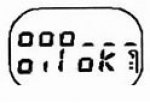
If the oil level has reached the minimum value, then after turning on the ignition the message "oil" and dashes will flash for 30 seconds. At the same time, the indicator warning about the need for service at the service (SERV) lights up, which continues to light even after starting the engine.

Note:
- During normal operation, the oil level is measured after the ignition has been switched off for more than one minute. In other cases, the old oil level is indicated.
- Normally, the registered oil level does not remain constant even with short mileage shoulders (for example, parking on a slope, delayed oil draining after stopping the engine, especially when cold, etc.).
2. Odometer.
The total mileage of the car is displayed after the oil level is indicated. The display time is 30 seconds. Pressing the ADAC or RESET buttons reduces the total mileage display time. The partial mileage is displayed instead of the total mileage after briefly pressing the ADAC button. The partial mileage counter is set to zero by pressing the RESET button.
Note: Mileage may be displayed in kilometers or miles, depending on the version.
3. On-board computer (ADAC)
After displaying information about the total mileage of the vehicle, information about the operating parameters of the vehicle can be displayed. Information is displayed by repeatedly pressing the ADAC button (located on the end of the wiper switch lever):
- total fuel consumption (in liters per 100 km or miles per gallon).

- average fuel consumption since last reset (in liters per 100 km or miles per gallon).

Average consumption is displayed only after the car has traveled at least 400 meters. It is calculated as the quotient of the total consumption divided by the distance traveled.
- current fuel consumption (in liters per 100 km or miles per gallon).
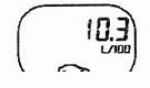
Current consumption is recorded at a speed above 30 km/h. When the accelerator pedal is released and the speed is above 30 km/h, the current fuel consumption is assumed to be zero.
Note: This option does not apply to vehicles supplied to the UK.
- mileage before fuel exhaustion (in kilometers or miles) under this vehicle driving mode.

Note: This option is disabled when the "low fuel" indicator is on.
- mileage since the last odometer reset.

- average speed since the last reset.

Average speed is defined as the quotient of the bullet's travel divided by the time of movement. The timer is built into the on-board computer.
Troubleshooting the on-board computer system
To perform troubleshooting, turn on the ignition (do not start the engine) and hold down the ADAC button. All the indicators should light up and the four pointers should move one step. A test image will appear on the display - all segments should light up.

To proceed to the next step of the test, press the ADAC button.
A message should appear indicating the remaining fuel in the tank.

The amount of fuel remaining indicated must correspond to the actual amount of fuel. To proceed to the next step of the test, press the ADAC button. Start the engine. A message about fuel consumption should appear (in liters/hour).

To proceed to the next step of the test, press the ADAC button.
A fault message should appear.
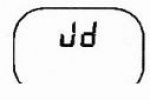
If the letter t is displayed, there is an incorrect fuel supply signal for more than four seconds. If the letter J is displayed, there is a fault in the fuel level indicator circuit (circuit break longer than 100 seconds). The sensor resistance should be between 5 and 350 Ohms. If the letter d is displayed, there is a permanently incorrect fuel supply signal. If the letter h is displayed, there is a fault in the oil level sensor circuit. The sensor resistance should be between 6 and 20 Ohms. If dashes are displayed, no faults have been detected. To stop diagnostics, press the RESET button.
Note: Diagnostics of vehicle systems is not performed by the on-board computer.
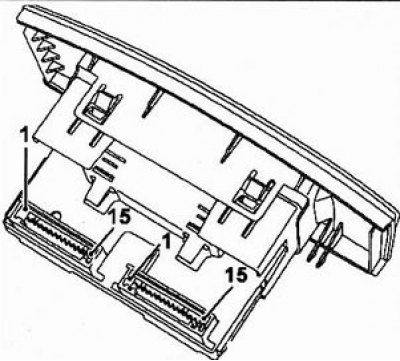
Display connector
15-pin connector (red).
| Terminal | Description |
| 1 | Outside air temperature |
| 2 | Outside air temperature |
| 3-4 | Not used |
| 5 | "Earth" |
| 6 | Backlight |
| 7 | Backlight power supply |
| 8 | + equipment |
| 9 | + battery |
| 10 | Outside cabin air temperature (output) |
| 11 | "Earth" (radio, terminal 6) |
| 12 | Radio on signal (radio, terminal 5) |
| 13 | Radio connection (terminal 1) |
| 14 | Radio connection (terminal 2) |
| 15 | Connecting the radio (terminal 3) |