



Contents: System management 🠛 Turning on the system 🠛 Enabling speed limit mode 🠛 Driving 🠛 Changing the speed limit 🠛 Exceeding the speed limit in an…🠛 System shutdown 🠛 Retrieving a saved speed limit value 🠛
System management
A speed limiter is a device that allows you to set a certain maximum speed. It can be useful, for example, when driving in the city or in places where a speed limit is imposed (men at work) etc. The use of this system is possible when the speed of movement reaches approximately 30 km/h.
This orange indicator light comes on on the instrument panel to indicate that the speed limiter is activated.
When the function is enabled, the message "Limiter" and a dash appear on the instrument panel.
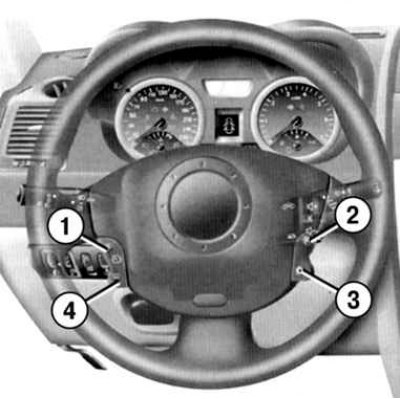
Fig. 1.91. System management: 1 – storing in memory and step-by-step increasing the speed value supported by the speed limitation system; 2 – recalling the stored speed limit value from memory; 3 – disable function (with memorization of the speed limit value); 4 – storing in memory and step-by-step reducing the speed maintained by the speed limitation system
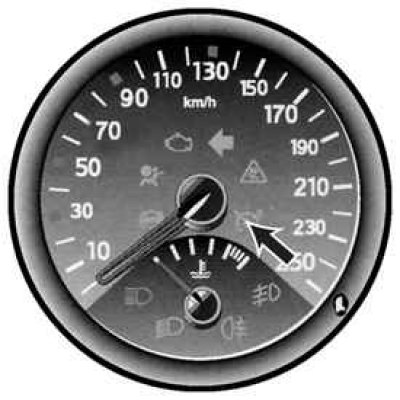
Fig. 1.92. System indicator lamp
Turning on the system
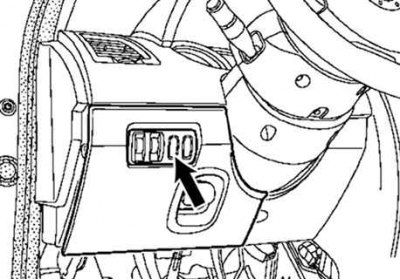
Fig. 1.90. Main switch of the cruise control/speed limitation system
Press the side switch (Fig. 1.90). The control lamp on the instrument panel will light up, and depending on the vehicle's configuration, the trip computer or matrix display will switch to speed limit mode.
Enabling speed limit mode
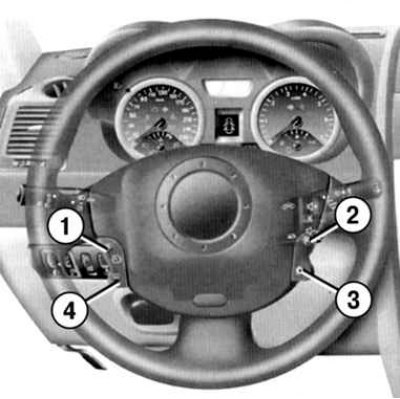
Fig. 1.91. System management: 1 – storing in memory and step-by-step increasing the speed value supported by the speed limitation system; 2 – recalling the stored speed limit value from memory; 3 – disable function (with memorization of the speed limit value); 4 – storing in memory and step-by-step reducing the speed maintained by the speed limitation system
At constant speed (starting from 30 km/h) press switch 2 – the speed value will be saved into memory (Fig. 1.91).
Driving
Once the speed limit value is stored in the system memory, driving the car is no different from normal until the set speed is reached. Any action on the accelerator pedal will not allow the programmed driving speed to be exceeded, except in emergency situations.
Changing the speed limit
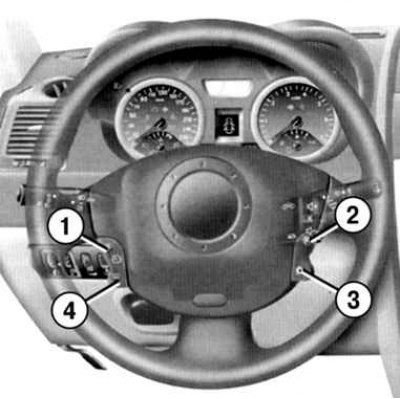
Fig. 1.91. System management: 1 – storing in memory and step-by-step increasing the speed value supported by the speed limitation system; 2 – recalling the stored speed limit value from memory; 3 – disable function (with memorization of the speed limit value); 4 – storing in memory and step-by-step reducing the speed maintained by the speed limitation system
You can change the speed limit value by successive short presses or by long pressing (see fig. 1.91):
- on button 2 to increase the speed value;
- press button 5 to decrease the speed value.
Exceeding the speed limit in an emergency
You can exceed the speed limit at any time by pressing the accelerator pedal sharply all the way down (overcoming her resistance).
During the time of exceeding the speed limit, the set speed value is displayed on the instrument panel display.
When there is no longer a need to exceed the speed limit, release the accelerator pedal and the speed limiter function will be restored as soon as the speed value drops below the previously set value.
The limiter cannot maintain the set speed limit if the system is unable to maintain the set speed limit (for example, when a car is moving down a steep slope), at the same time, the set speed value flashes on the instrument panel.
System shutdown
The speed limitation system is disabled by pressing:
- buttons 3 - in this case, the speed value remains in the system's memory, and the message "Value entered into memory" appears on the instrument panel display;
- buttons 1 - in this case, the speed value does not remain in the system memory, and the control lamp on the instrument panel goes out, confirming that the function is disabled.
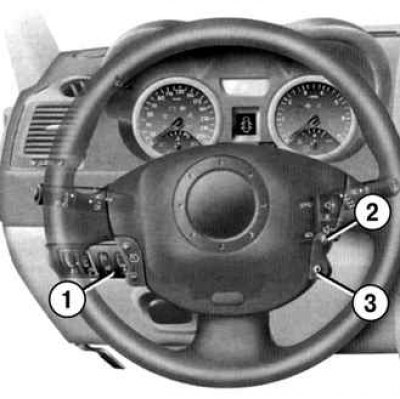
Fig. 1.93. System shutdown
Retrieving a saved speed limit value
If the set speed value is stored in memory, it can be recalled by pressing button 3 until the message "Speed limiter" appears.