
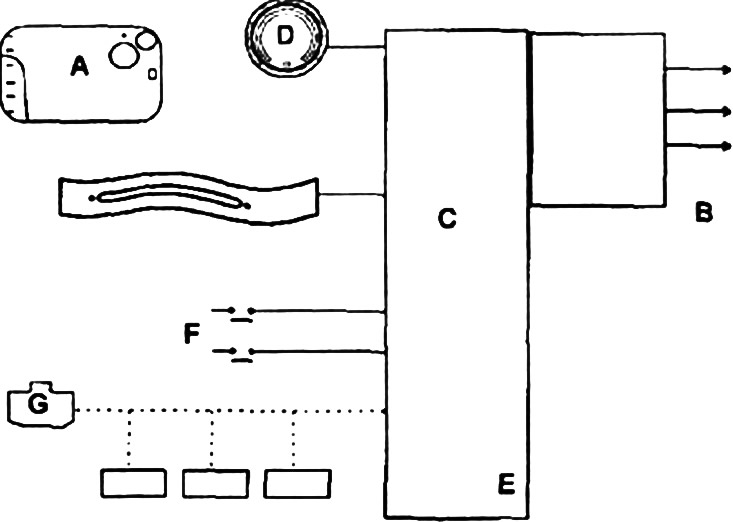
- Renault card (A);
- radio receiver, built-in reader (IN);
- electronic control unit built into the central computer (WITH);
- engine start button (ABOUT):
- door locks;
- red control lamp of the closed door;
- car direction indicators;
- injection computer (E);
- brake and clutch pedal sensors (F) and the neutral position of the gearbox;
- electric steering column lock (G).
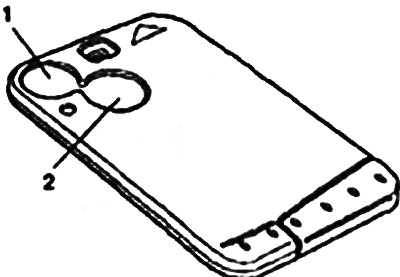
There are two buttons on a simple Renault map:
- lock button (1);
- unlock button (2).
Locking the doors
To lock the car doors, press the button «closing».
Remote door locking may be accompanied by flashing hazard warning lights (if all the doors are well closed). The red lock indicator lamp also lights up.
If one or more doors are not properly closed, the hazard warning lights will not come on when locking with the remote control.
Unlocking doors
To unlock the car doors, press the button «opening».
Unlocking the doors is accompanied by a flashing emergency light.
Note. Activation of the emergency light signaling at request of remote control is made by the central computer.
When locking the doors with the remote control, the central locking button is blocked.
Some cars (right hand drive variant) equipped with the function «additional blocking», which locks the doors to prevent the vehicle from being opened from the inside. To lock the vehicle, briefly press the button twice or once for a long time «closing» (1). This function uses special additional locking motors.
Right hand drive vehicles may be equipped with «opening the driver's door only». This function allows only the driver's door to be unlocked by a short press on the Renault card. Two consecutive presses are required to open all doors.
On vehicles equipped with pulsed power windows or electric sunroof, long press the button «closing» (1) allows you to close all opening elements (before that they must be initialized).