



Contents: Removal 🠛 Installation 🠛
Removal
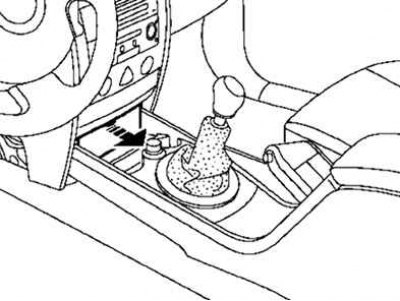
Fig. 8.91. Removing the access cover to the diagnostic connector
Remove the diagnostic connector access cover (Fig. 8.91).
Remove the card reader cover by pressing the spring latches (Fig. 8.92).
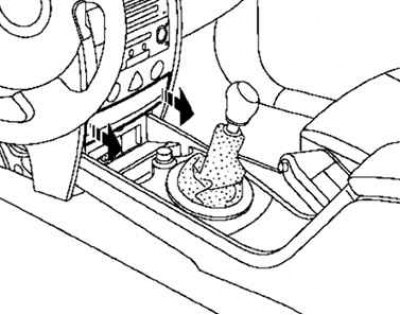
Fig. 8.92. Removing the card reader cover
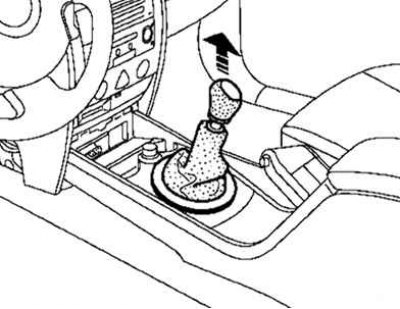
Fig. 8.93. Removing the gear shift lever boot and lever handle
Disconnect the gear shift lever boot and the gear shift handle (Fig. 8.93).
Open the glove compartment.
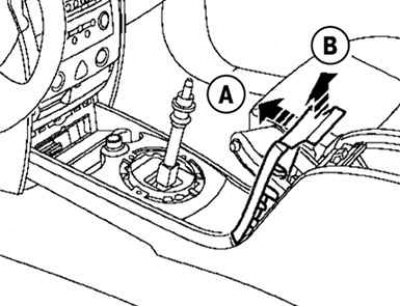
Fig. 8.94. Removing the parking brake handle trim
Disconnect the parking brake handle trim by moving it sequentially in directions A and B (Fig. 8.94).
Disconnect the seat heating element connectors (if the car is equipped with them).
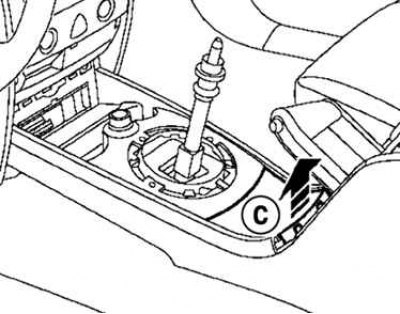
Fig. 8.95. Removing the bottom cover
Remove the bottom cover (Fig. 8.95).
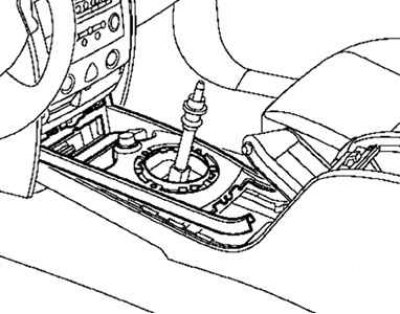
Fig. 8.96. Disconnecting the cigarette lighter connector
Disconnect the cigarette lighter holder and disconnect the cigarette lighter connector (Fig. 8.96).
Disconnect the seat heating element connectors (if the car is equipped with them).
Remove both front seats.
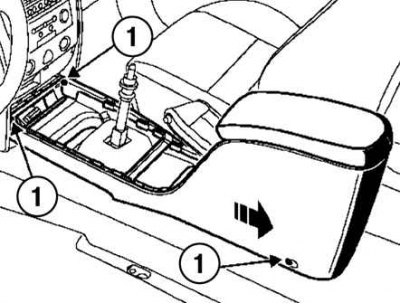
Fig. 8.97. Removing the selector lever console: 1 – console mounts
Slide the console slightly in the direction of the arrow shown in Figure 8.97 and remove it.
Installation
Installation is carried out in the reverse order of removal.