



- radio receiver, player without display;
- same with the display;
- radio, single or multiple disc player without display;
- the same with the display.
Radio receiver capabilities:
- listening to radio broadcasts (four geographic zones can be programmed in the FM range);
- rDS station name indication;
- automatic tuning to the station with the best reception quality (aF function);
- getting traffic information (tA function);
- receiving emergency messages (PTY NEWS).
Player features:
- automatic playback of a cassette tape after selecting a source from the remote control or control panel;
- dolby noise reduction function;
- fast forward or rewind with search by pauses between tracks (is switched on by separate buttons);
- mute function (stops playback of the tape when the speech synthesizer or telephone is turned on).
CD player features:
- playback of regular compact discs and CD-ROM audio tracks. The recording for playback is selected in order or randomly.
The audio system is equipped with thermal protection when the temperature at which the equipment can function normally is exceeded, and automatic reduction of the sound volume (the volume on the display does not change).
The audio system is protected by a four-digit code. The code must be entered using the remote control (remote control) or the car radio keyboard after each disconnection of the battery.
The procedure for entering the code is given in the manual for the audio system.
If you enter an incorrect code, the system is blocked (for one minute for the first incorrect entry, for two minutes for the second, for four minutes for the third, etc.).
After the initial code entry, some settings must be programmed. These settings are retained if the battery is disconnected.
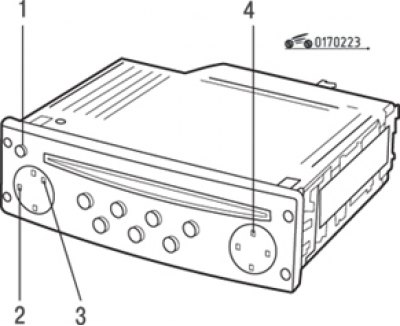
Fig. 2.23. Audio system control knobs: 1 – on and off; 2 – mode selection and menu access buttons; 3 – buttons for changing settings; 4 – "Source" button
To program, press button 4 (Fig. 2.23) and hold it until you hear a beep (about 4 sec). Then set the functions:
- aF mode on (automatic setup);
- change the sound volume depending on the speed of the car ("5" for maximum change, "0" to cancel the change);
- turn on the "Volume" mode;
- enable "Tuner Support" mode;
- select the number of speakers (2 or 4);
- manual or dynamic list selection.
Note: Short press on button 4 (see fig. 2.23) during the programming process, it cancels all changes made.
(Text provided by an online resource RenaultBook.ru)
The sound volume can be adjusted depending on the speed of the car. To activate this function, select the desired sound volume setting in the "Programming" mode (press and hold button 4 (see fig. 2.23), until you hear a beep) – "5" for maximum change, "0" to cancel the change.