
English Русский
Български
Беларускі
Український
Српски
Hrvatski
Română
Polski
Slovenský
Magyar
Bookmark Contacts Articles Sitemap
Company vehicles Peugeot Company vehicles Opel Company vehicles Skoda Company vehicles Land Rover Company vehicles Mitsubishi Company vehicles Volkswagen Company vehicles Honda
RenaultBook.ru


Duster   Fluence   Kangoo   Laguna   Logan   Megane   Sandero   Scenic   Symbol   Clio   Other
Laguna 2 (2001-2007)

On-board computer (Renault Laguna 2)

  • Main
  • Laguna
  • Laguna 2 (2001-2007)
  • General information
  • User manual
  • On-board computer
0
On-board computer information is available 30 seconds after the ignition is turned on.

The data is reset by pressing the corresponding button.

The on-board computer displays information on a display located in the instrument cluster.

To select the information display, press the button located at the end of the windshield washer and wiper switch in sequence and briefly. To reset the vehicle's daily mileage counter, press and hold button 29.

When the ignition is turned on, the information on the on-board computer screen always appears in a certain sequence, and after the end of the cycle, the information output starts over again. The information is displayed on the screen in the sequence given below.
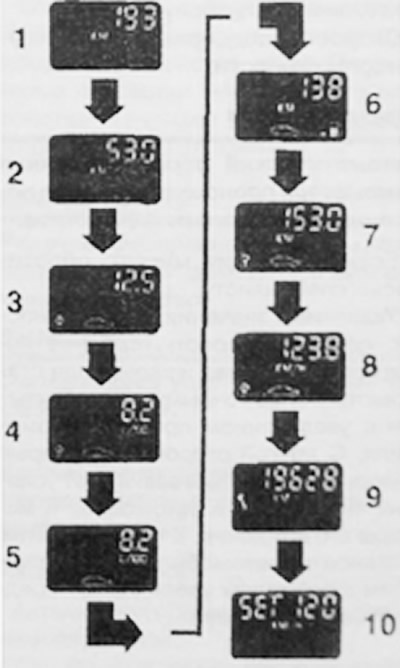
When the ignition is turned on, the information on the on-board computer screen always appears in a…


Total mileage of the vehicle.

The distance traveled by the vehicle after the last reset of the vehicle's daily mileage counter.

Fuel consumption in liters since the last reset of the vehicle's trip meter.

Average fuel consumption in liters per 100 km (after the last reset and 400 m run). This is a private value of fuel consumption and vehicle mileage.

Continuous fuel consumption in liters per 100 km.


This value is displayed after the vehicle reaches a speed of more than 25 mph.

Estimated vehicle mileage on the remaining fuel in the tank when driving at an average speed. This value does not always correspond to the average fuel consumption. The value is calculated based on the average fuel consumption during the vehicle's last 400 m.

The distance traveled by the vehicle since the vehicle's trip meter was last reset.

This note was copied from the resource renaultbook.ru

Average vehicle speed in km/h after the last reset. The value is calculated after the vehicle has traveled the last 400 m.

The remaining mileage of the vehicle before maintenance.

The speed maintained by the speed controller.

Note: Automatic reset of computer readings occurs if one of the parameters is full.


If the indicator flashes, contact a specialist.

The values shown, especially average speed, average fuel consumption and range, become more accurate and stable as the vehicle mileage increases. On the other hand, some display values depend on the vehicle operating conditions and driving style. In addition, frequent stops with the engine running increase average fuel consumption.

Resetting the maintenance indicator


To reset the service indicator, follow these steps:
  • turn on the ignition;.
  • select information: "Remaining mileage of the car before maintenance";
  • press button 29 and hold it for more than 6 s, the indicator should flash 4 times, then the nominal maintenance value will be set, which should also flash 4 times;
  • release button 29, after which the value will be written into memory.
This article is available on: russian, bulgarian, belarusian, ukrainian, serbian, croatian, romanian, polish, slovak, hungarian
Article has been reviewed by editor: Podkrepilov Maxim
Share with friends:
Previous
Laguna 2: User manual
Next

Control lamps and signaling devices
Instrument cluster
Controls, control and measuring instruments
Opening and closing the hood
Locking and unlocking doors in the usual way
Clock and temperature readings
Parking assistance system
Speech synthesizer
Renault Card Reader
Cruise control/speed limiter
Other articles on other Renault models

➽ On-board computer Renault Duster 1 (2009-2017)
➽ On-board computer Renault Fluence 1 (2009-2020, petrol)
➽ On-board computer Renault Scenic 1 (1996-2003)
➽ On-board computer Renault 19 (1988-1996)
➽ Computer device Renault Kangoo 1 (1997-2007)
Link to this article in different formats
Reviews and comments of visitors
No comments yet


Add two numbers 20 + 18


Laguna 2 (2001-2007) 
  • General information
  • User manual
  • Maintenance
  • Power unit
  • Engine repair
  • Cooling system
  • Fuel system
  • Fuel injection (petrol)
  • Power system (petrol)
  • Fuel injection (diesel)
  • Fuel system (diesel)
  • Exhaust system
  • Transmission
  • Clutch
  • Mechanical gearbox
  • Automatic gearbox
  • Drive shafts
  • Chassis, running gear
  • Wheels and tires
  • Car suspension
  • Steering
  • Brake system
  • Body and interior
  • Exterior (external elements)
  • Doors, locks and windows
  • Electrical equipment
  • Power devices
  • Equipment and devices
  • Headlights and lighting
  • Breakers and switches
  • Safety system
  • Electrical circuits
RenaultBook.ru © 2018–2026 | Mobile version | News and articles | Sitemap: EN BG BY UA RS HR RO PL SK HU | Administration | Site search | Bookmark
Duster 1 (2009-2017) | Fluence 1 (2009-2020, petrol) | Kangoo 1 (1997-2007) | Laguna 2 (2001-2007) | Logan 1 (2004-2012, petrol) | Logan 2 (2012-2020) | Megane 1 (1995-2002) | Megan 2 (2002-2009, petrol) | Sandero 1 (2007-2012, petrol) | Scenic 1 (1996-2003) | Symbol 1 (1999-2008, petrol) | Symbol 2 (2008-2013, petrol) | Renault 19 (1988-1996) | Espace I and II (1984-1996) | Espace III (1996-2002) | Clio 1 (1990-1998) |
We want your visit to be comfortable 😌 and use cookies 🍪 to do so.