
English Русский
Български
Беларускі
Український
Српски
Hrvatski
Română
Polski
Slovenský
Magyar
Bookmark Contacts Articles Sitemap
Company vehicles Peugeot Company vehicles Opel Company vehicles Skoda Company vehicles Land Rover Company vehicles Mitsubishi Company vehicles Volkswagen Company vehicles Honda
RenaultBook.ru


Duster   Fluence   Kangoo   Laguna   Logan   Megane   Sandero   Scenic   Symbol   Clio   Other
Duster 1 (2009-2017)

On-board computer (Renault Duster 1)

  • Main
  • Duster
  • Duster 1 (2009-2017)
  • User manual
  • Governing bodies
  • On-board computer
0
The indication depends on the vehicle configuration and the country of delivery.

The indication depends on the vehicle configuration and the country of delivery.

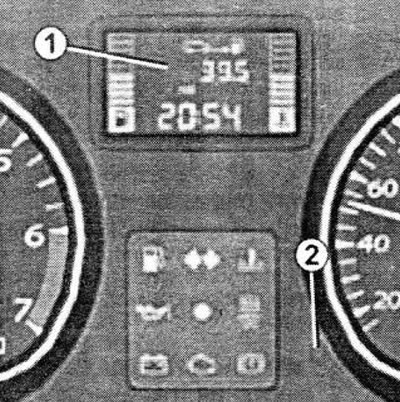
  • 1 - Display
  • 2 - Button for resetting the on-board computer and trip odometer

To reset the trip odometer, switch the display to the "Trip odometer" mode.

Press button 2 and hold it for a while.
Press button 2 and hold it for a while.

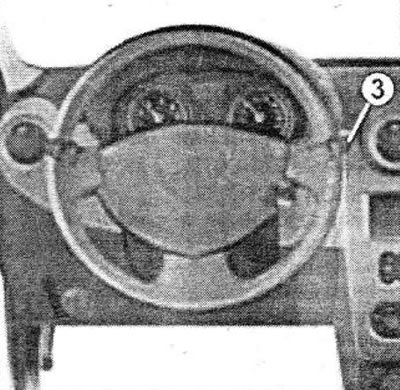
  • 3 - Control of data display on the display.

When you press key 3 briefly, the following information is displayed sequentially:
  • a) total mileage;
  • b) mileage per trip;
  • c) fuel consumption;
  • d) average fuel consumption;
  • e) expected range;
  • f) distance traveled;
  • d) average speed.


(You can find the original at this link renaultbook)
This article is available on: russian, bulgarian, belarusian, ukrainian, serbian, croatian, romanian, polish, slovak, hungarian
Article has been reviewed by editor: Fedoseev Denis
Share with friends:
Previous
Duster 1: Governing bodies
Next

Multifunctional display A
Display and control lamps
Control lamps on console B
Instrument cluster warning lights A
Dashboard
Steering wheel, power steering
Clock — setting the exact time
Sound and light alarm
Outdoor lighting and signaling devices
Adjusting the headlights in the vertical plane
Other articles on other Renault models

➽ On-board computer Renault Fluence 1 (2009-2020, petrol)
➽ On-board computer Renault Laguna 2 (2001-2007)
➽ On-board computer Renault Scenic 1 (1996-2003)
➽ On-board computer Renault 19 (1988-1996)
➽ Computer device Renault Kangoo 1 (1997-2007)
Link to this article in different formats
Reviews and comments of visitors
No comments yet


Add two numbers 23 + 50


Duster 1 (2009-2017) 
  • User manual
  • Governing bodies
  • Car driving
  • Devices for comfort
  • Car care
  • Practical Tips
  • Power unit
  • Petrol engine (K4M)
  • Diesel engine (K9K)
  • Power system (K4M)
  • Power system (K9K)
  • Fuel system
  • Petrol injection system (K4M)
  • Diesel injection system (K9K)
  • Starting and ignition system
  • Cooling system
  • Exhaust system
  • Transmission
  • Clutch
  • Manual gearbox
  • Drive shafts
  • Chassis, running gear
  • Front bearing elements
  • Rear load-bearing elements
  • Steering
  • Control devices
  • Body and interior
  • Exterior (external elements)
  • Interior (internal elements)
  • Interior trim
  • Interior heating
  • Air conditioning
  • Electrical equipment
  • Equipment and devices
  • Headlights and lighting
  • Governing bodies
  • Wipers/washers
  • Audio system
  • Electrical circuits
RenaultBook.ru © 2018–2026 | Mobile version | News and articles | Sitemap: EN BG BY UA RS HR RO PL SK HU | Administration | Site search | Bookmark
Duster 1 (2009-2017) | Fluence 1 (2009-2020, petrol) | Kangoo 1 (1997-2007) | Laguna 2 (2001-2007) | Logan 1 (2004-2012, petrol) | Logan 2 (2012-2020) | Megane 1 (1995-2002) | Megan 2 (2002-2009, petrol) | Sandero 1 (2007-2012, petrol) | Scenic 1 (1996-2003) | Symbol 1 (1999-2008, petrol) | Symbol 2 (2008-2013, petrol) | Renault 19 (1988-1996) | Espace I and II (1984-1996) | Espace III (1996-2002) | Clio 1 (1990-1998) |
We want your visit to be comfortable 😌 and use cookies 🍪 to do so.