Contents: Resetting the trip odometer 🠛 Resetting trip data (reset button) 🠛 Automatic reset of trip data 🠛 Information messages 🠛 Examples of on-board computer…🠛 Signaling devices and indicators 🠛
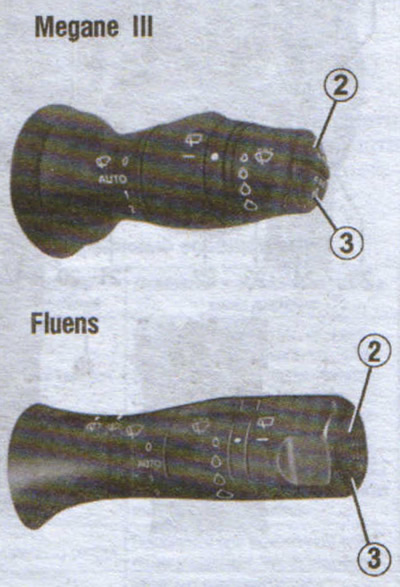
The search for information is carried out by successive short presses of the buttons: up (2) or down (3).
The on-board computer indication depends on the vehicle equipment and the country of delivery.
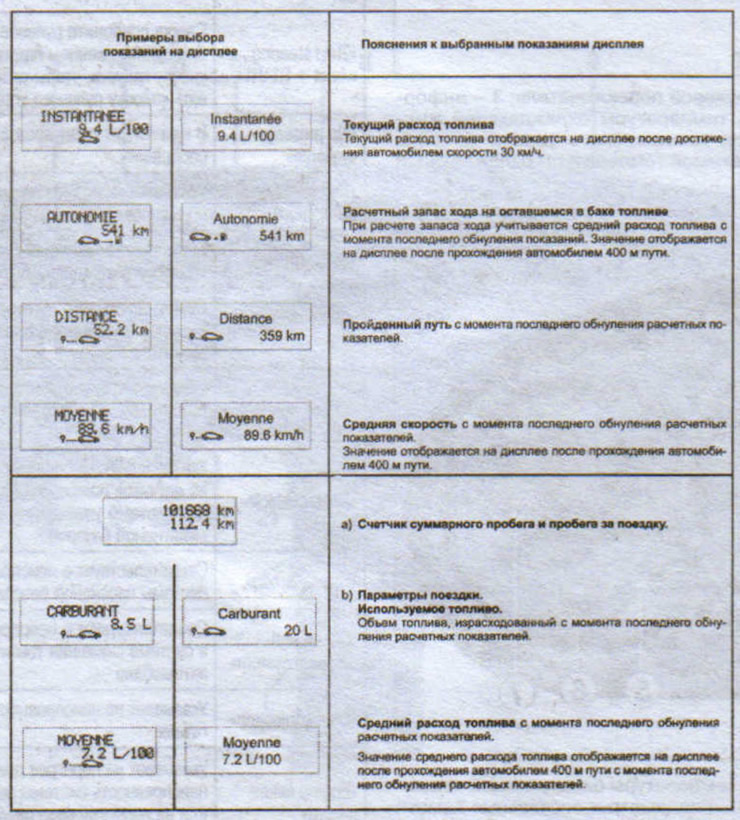
a) Total mileage and trip mileage counter.
b) Travel details:
- fuel used:
- average fuel consumption;
- current fuel consumption;
- estimated range;
- path traveled;
- average speed.
c) Mileage until the next scheduled maintenance.
d) Tire pressure monitoring system.
e) Menu of individual vehicle settings.
f) Flight log, sequential output of information messages and messages about operational disturbances.
Resetting the trip odometer
After turning on the "trip odometer" indication, hold down one of the buttons 2 or 3 until the readings are reset.
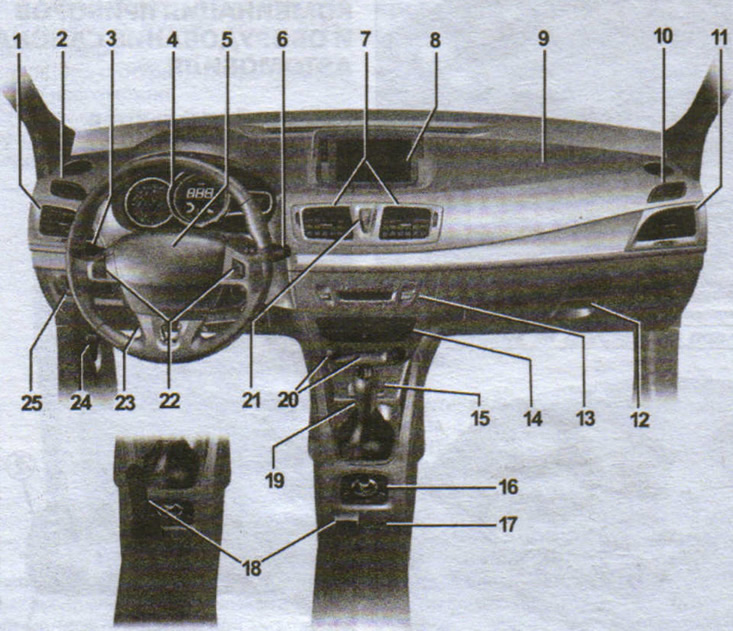
Controls and interior equipment of the Megane III:
1 - side deflector;
2 — side window blower grille;
3 — direction indicator switch lever;
4 - instrument cluster;
5 - Driver's airbag and horn switch;
6 — steering column switch for windshield wipers/washers for the windshield and rear windows, button for changing trip computer modes and menu for individual vehicle settings;
7 - central deflectors;
8 - information display;
9 - passenger airbag;
10 — side window blower nozzle;
11 - side deflector;
12 - storage box;
13 — climate control system controls;
14 — place for installation of audio system, navigation system;
15 — power socket for additional equipment;
16 — multimedia equipment controls;
17 — General switch for speed controller/limiter;
18 — controls for automatic or mechanical parking brake;
19 — gear shift lever;
20 - Engine start/stop button and Renault card reader;
21 — control button for locking/unlocking opening elements of the body and emergency signaling button;
22 - Speed controller/limiter switches;
23 — steering column tilt and reach adjustment handle;
24 — hood lock drive handle;
25 — controls: electric adjustment of headlights in the vertical plane, instrument lighting brightness regulator, on/off switch of the anti-skid system, on/off switch of the parking control system.
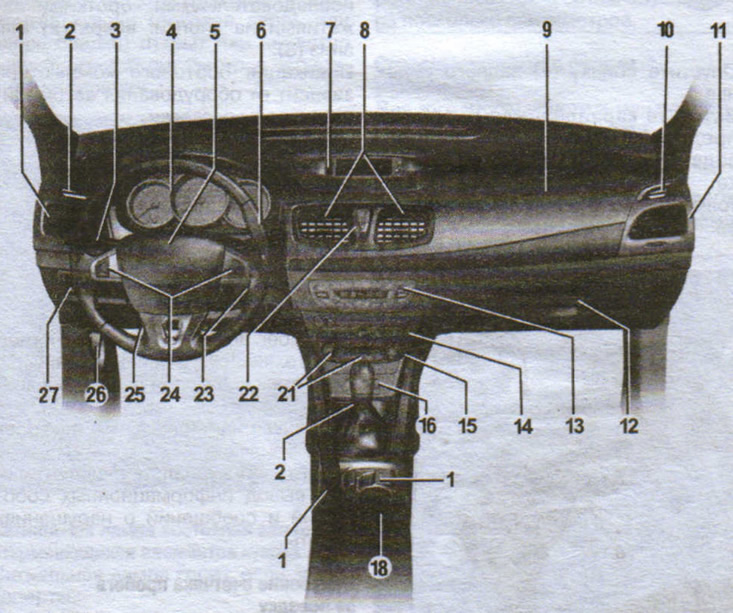
Fluens car interior controls and equipment:
1 - side deflector;
2 — side window blower grille;
3 - Switch lever: direction indicators, exterior lighting, fog lights, rear fog light;
4 - instrument cluster;
5 - Driver's airbag and horn switch;
6 — windshield wiper/washer switch for the windshield and rear windows, trip computer mode change button and vehicle individual settings menu;
7 - information display;
8 - central deflectors;
9 - passenger airbag;
10 — side window blower nozzle;
11 - side deflector;
12 - storage box;
13 — controls for the heating, ventilation and air conditioning system;
14 — place for installation of audio system, navigation system;
15 — cigarette lighter;
16 - power socket for additional equipment;
17 - Can holder;
18 - General switch for speed controller/limiter;
19 — parking brake lever;
20 — gear shift lever;
21 - Engine start/stop button and Renault card reader;
22 — control buttons for locking/unlocking opening elements of the body and the hazard warning switch;
23 - ignition switch for starting the engine with a key;
24 — speed controller/limiter controls;
25 — steering column tilt and reach adjustment handle;
26 — hood lock drive handle;
27 — controls: electric adjustment of headlights in the vertical plane, instrument lighting brightness regulator, on/off switch of the anti-skid system, on/off switch of the parking control system.
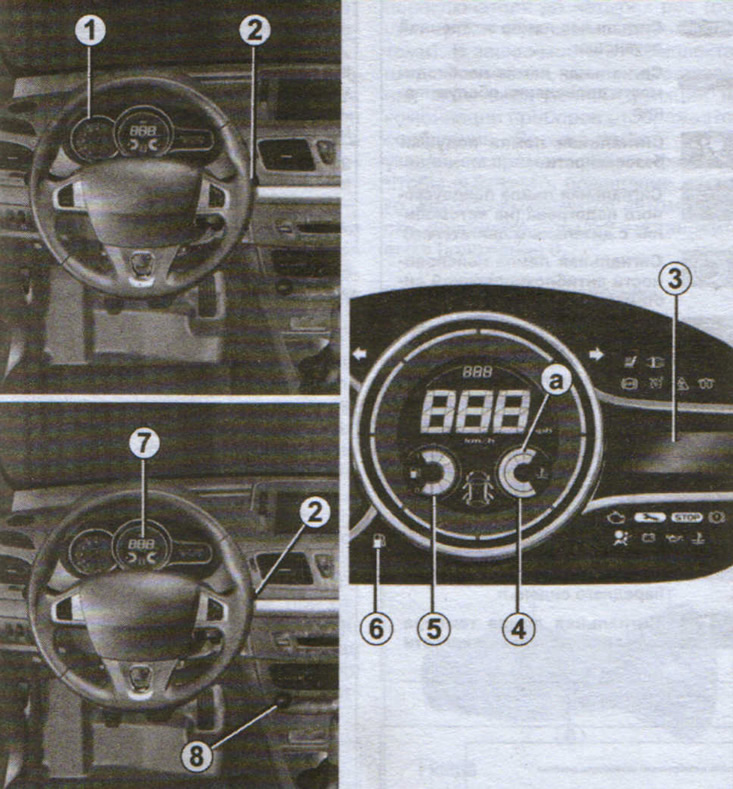
Megane III instrument cluster:
1 - tachometer;
2 - steering column switch;
3 — instrument cluster information display;
4 - coolant temperature indicator;
5 — fuel level indicator;
6 — minimum fuel level indicator light;
7 — speedometer;
8 — engine start button;
a — zone of permissible coolant temperature.
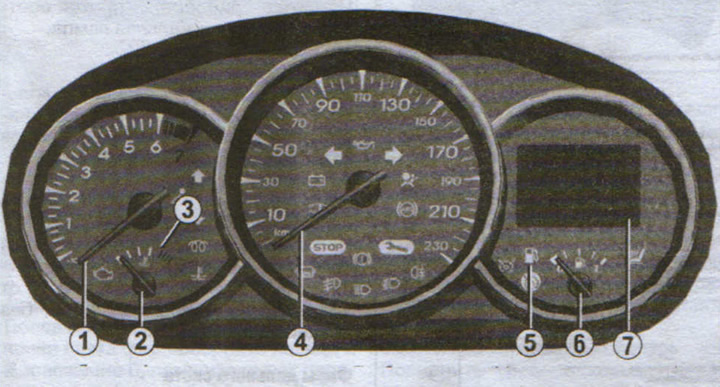
Fluens instrument cluster:
1 - tachometer;
2 - coolant temperature indicator;
3 — instrument cluster information display;
4 - speedometer and indicator lights;
5 — minimum fuel level indicator light;
6 — fuel level indicator;
7 - Multifunctional display.
Resetting trip data (reset button)
After turning on the indication of one of the trip parameters, hold down one of the buttons 2 or 3 until the readings are reset.
Automatic reset of trip data
When the memory capacity of one of the storage devices is exceeded, zeroing occurs automatically.
Information messages
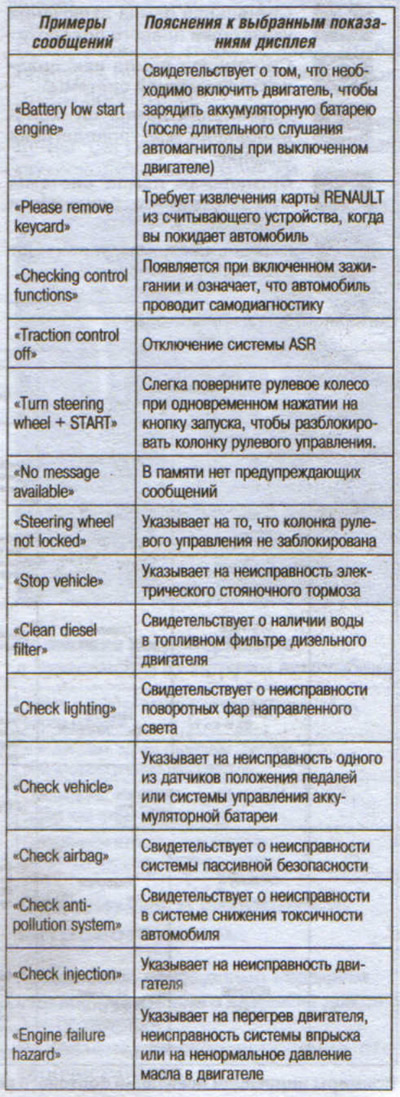
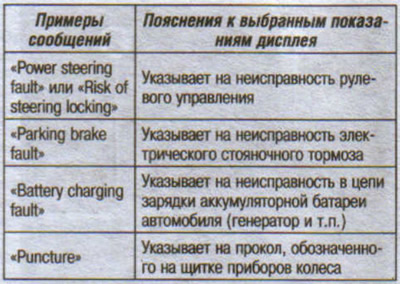
Examples of on-board computer indications
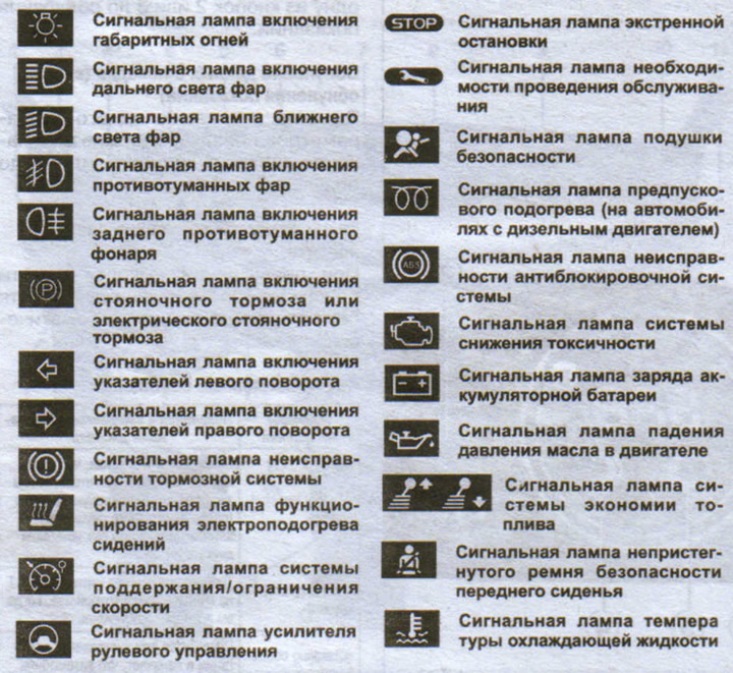
Signaling devices and indicators